
Are you organizing a trade show with the operation spread across several tools?
That is: the booth map in a spreadsheet, contracts sent by email, questions arriving on WhatsApp…
None of this is a management mistake. It’s just information in too many places.
But that’s exactly the problem Even3 solves with the Trade Show Module: bringing registration, booths, documents, billing, and leads together in the same environment where you already organize the entire event.
In this article, you’ll learn how to manage exhibitors on Even3 from start to finish:
- What the Trade Show Module delivers for your operation;
- How the Exhibitor and Sponsor Area works on Even3;
- How the platform organizes booths, contracts, circulars, and forms;
- How add-on sales and invoicing work;
- How exhibitors capture leads on event day;
- What practical gains you’ll notice from the very first edition.
What managing exhibitors on Even3 means
First of all, managing exhibitors is much more than filling in the trade show map.
After the booth is sold, the part that really takes time begins: the contract, company details, representatives, deadlines…
On top of that, there’s artwork submission, power requests, furniture, billing, installments and, on the day itself, lead capture.
On Even3, all of this happens in the Trade Show Module, divided into three fronts that work together:
- Exhibitors: registration of the companies and the representatives who will access the platform, plus booth sales by category;
- Sales: sale of the trade show’s products and services + invoicing and financial control;
- Documents: contracts, forms, and circulars linked to each exhibitor.
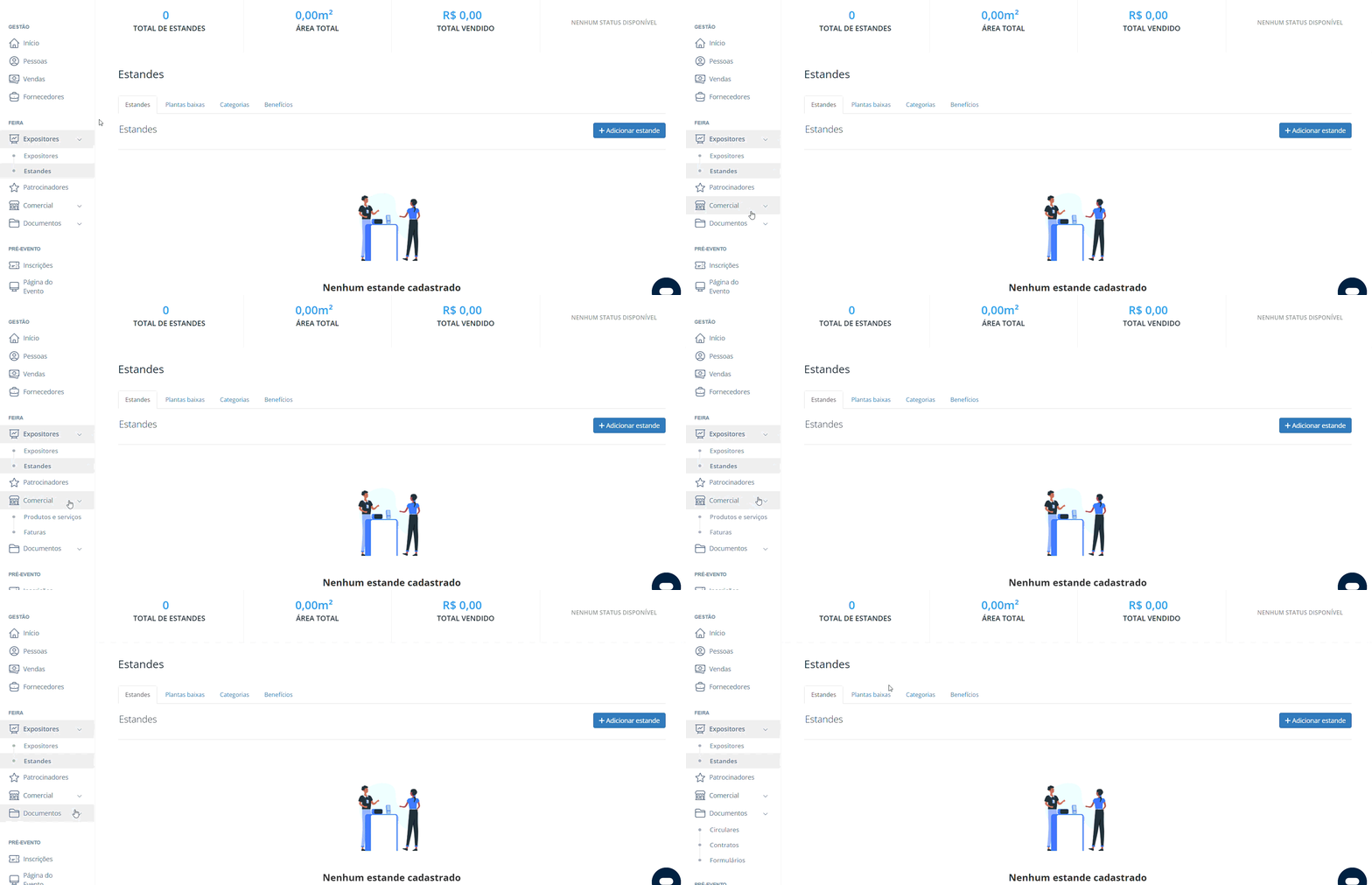
On the other side, the exhibitor enters the Exhibitor and Sponsor Area and finds everything related to their participation. Without having to ask for anything by email.
In the end, the result is straightforward: your team answers fewer repeated questions and starts tracking the trade show by status, not by memory.
Want to know how each detail works in practice? I’ll tell you now!
Registering exhibitors and representatives: the starting point
To begin with, it works like this: when you register an exhibiting company, you also register its main representative.
This person accesses Even3 with the email provided and immediately finds the Exhibitor Area linked to your event.
Then, the exhibitor can add other representatives from their team. In practice, this is what happens at larger trade shows: the sales team is added to sign contracts, marketing to follow up on visual deliverables, and the field team for the operation on event day.
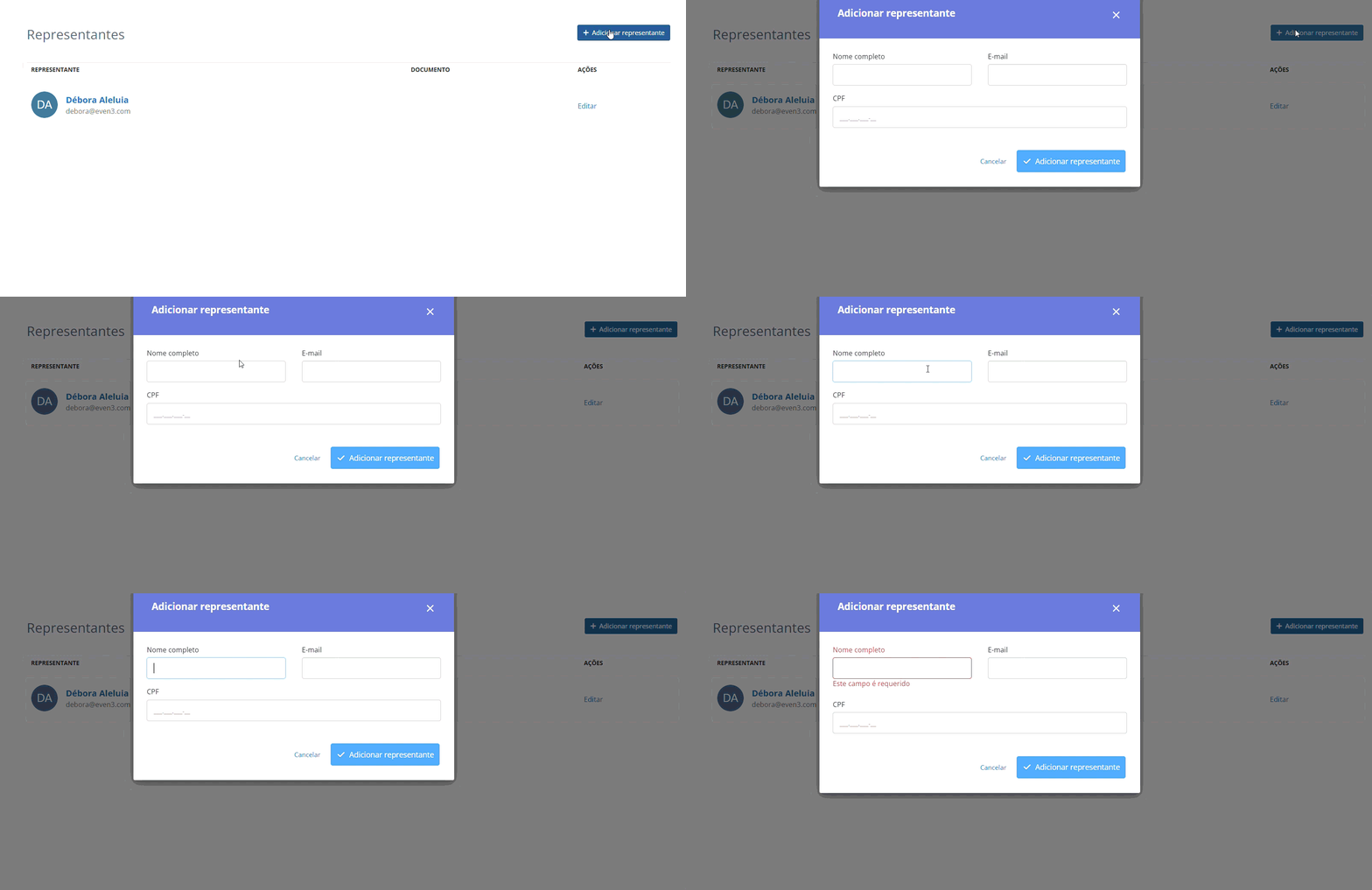
Once registration is done, you have a single official list of who is at the trade show. This list feeds contracts, invoices, circulars, and access to the lead capture app.
Exhibitor and Sponsor Area: autonomy for those who exhibit
For the exhibitor or sponsor, what they get access to is a support area for successful management.
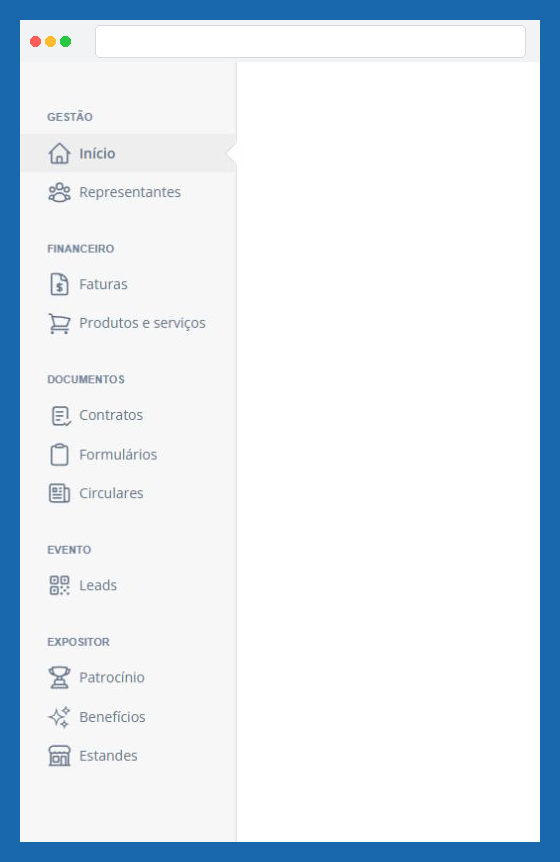
Basically, the Exhibitor and Sponsor Area brings together, in one place, everything the organization has made available to that company. Here’s what the exhibitor finds inside:
| Area | What the exhibitor does |
|---|---|
| Representatives | Views and adds team members |
| Invoices | Tracks charges and pays in full or in installments |
| Products and services | Orders furniture, infrastructure, and extras, and tracks orders |
| Contracts | Views and signs pending documents |
| Forms | Answers the questionnaires sent by the organization |
| Circulars | Checks official notices, rules, and files saved on the platform |
| Leads | Tracks and rates the contacts collected during the event |
| Sponsorship and benefits | Reviews the contracted tier, coupons, deliverables, and contract |
| Booths | Sees the spaces linked to the company and the published maps |
Notice the effect: the exhibitor doesn’t need to ask for their booth number, whether the contract has been signed, or where the manual is. Everything is at hand, all the time.
Overall, everyone gains something very valuable: a history that doesn’t leave the company when someone leaves the team.
Want to see how each part works? Then keep reading!
Booths: physical and commercial control on the same dashboard
Right away, the booths menu works as your trade show’s control panel.
As soon as you open it, you track the numbers that matter for commercial decisions:
- Total registered booths;
- Available area in m²;
- Total amount sold;
- A chart with the status of each space: available, reserved, or sold.
Below that, the booth list shows the number or code, dimensions, hall, category, associated exhibitor, main contact, and a colored tag with the current status.
Categories and pricing
You create categories to classify spaces and set different prices by booth type. In other words, this is how the difference between a corner booth and a mid-aisle booth stops being a case-by-case negotiation and becomes a clear rule in the price list.

Floor plan and maps
The floor plan accepts uploads of visual files and lets you manage several maps separately: Hall 1, Hall 2, the outdoor area, and whatever else your trade show has.
These maps also appear for the exhibitor, in their Area. That way, everyone looks at the same version. It’s important to always keep it up to date.
Bulk registration
For trade shows with many spaces, bulk registration solves in minutes what would take an afternoon to fill in.
Basically, it works like this: you define the prefix, start and end numbers, width, length, and sale price. Then, the platform generates the entire sequence.
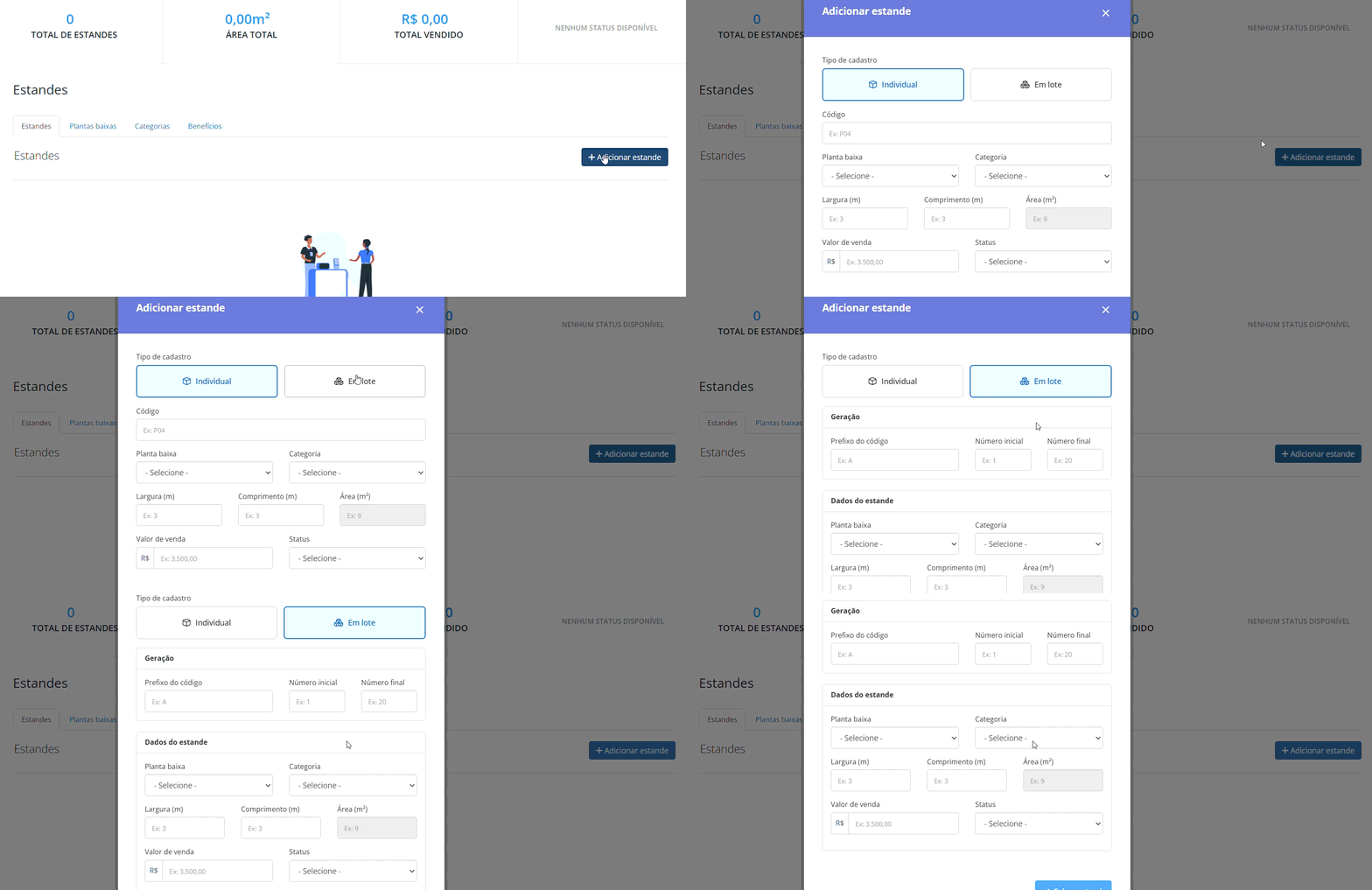
Heads up: Trade shows with unique characteristics can still use individual registration, space by space.
Selling booths, products, and add-on services
Moving on… a trade show’s revenue rarely stops at the booth!
For example: extra power outlets, furniture, decoration, build-out services… All of this can be offered as extra services and represent a significant share of revenue. And it doesn’t have to be a hassle!
On Even3, you make products and services available directly in the Exhibitor Area. The company searches for items, filters by category or status, places the order, and tracks everything in “My orders”.

The gain is twofold:
- For you: orders arrive organized, with a record of who ordered what and when;
- For the exhibitor: they handle it on their own, on their own schedule, without depending on a reply from your team.
In the end, that means fewer confirmation emails and more autonomy in setting up the trade show.
Contracts with digital signature and legal validity
In addition, to ensure the security of purchases and sales on the platform, your contracts are also stored on Even3.
The Digital Signature tool lets you create, send, track, and sign documents within the platform itself, always linked to the event and to the corresponding exhibitor or sponsor.
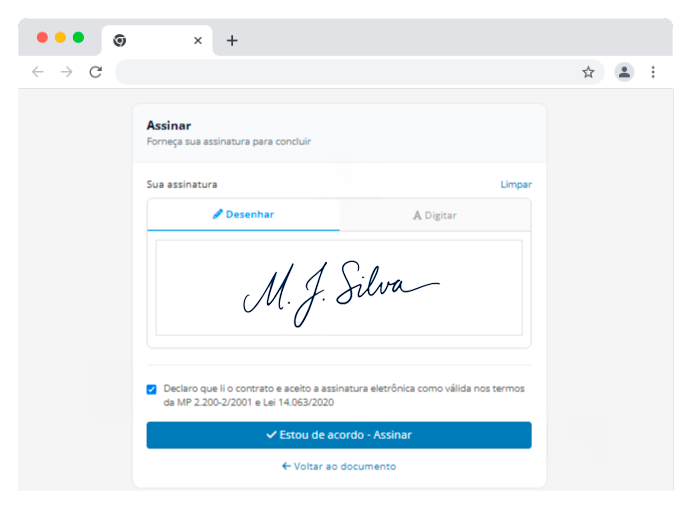
In practice, it works like this:
- You link the contract to the company already registered and attach the PDF;
- You enter the name and email of each person who needs to sign;
- The recipient receives an email with the deadline and the signature button;
- They sign electronically, with legal validity;
- A six-digit code, sent by email, confirms authentication.
Meanwhile, you track in real time how many signatures are done and how many are still pending. You can also check the document’s full action history in chronological order.
The final contract has legal validity and gets an audit page at the end, with the signature records, history, and authenticity data.
Also, if the exhibitor disagrees with any term, they can decline the document on the same screen. That way, the objection arrives on record, not lost in an email thread.
This flow works for both the booth contract and the sponsorship agreement.
Forms: collect the right information from each exhibitor
Sometimes, you need to ask your exhibitors for additional information.
With custom forms, you build tailor-made questionnaires to collect data about the company, its representatives, or its participation in the trade show.
For example, you can use them to request the fascia board artwork, billing details, a list of booth builders, power requirements, or any information specific to your operation.
When creating the form, you define:
- The title and purpose;
- Whether submission is mandatory;
- Who can answer that specific form.
Once published, the form appears in the Exhibitor Area of the selected companies.
Responses are recorded and can be exported whenever you need them. Or by anyone else on your team who has access to that menu.
That way, information doesn’t circulate across spreadsheets or emails, but stays centralized in one place, securely and with easy access.
Circulars: official notices with read confirmation
Every trade show has that notice that can’t get lost. For example, a change in build-out hours, the exhibitor manual, final calls…
Circulars are the organization’s official notices. You send guidelines, rules, operational notices, and attached files directly to registered exhibitors and sponsors.
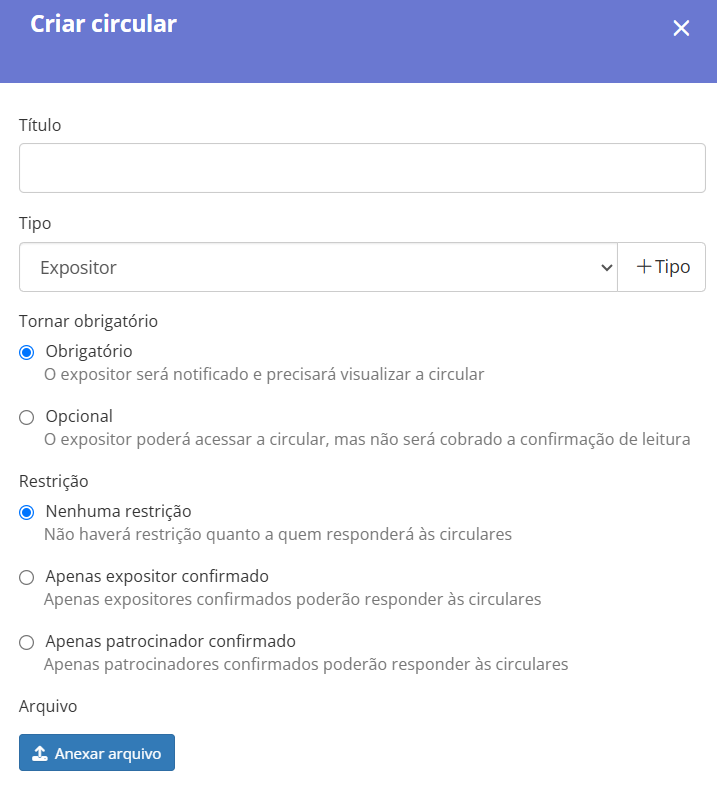
Two features make the difference here:
- Mandatory viewing: you define that reading is mandatory and track who has already viewed it;
- Recipient selection: you can choose the specific audience that will receive the circular.
Invoices and invoicing: the financial side without parallel control
Still with the goal of reducing spreadsheets and emails, the invoices submenu centralizes the trade show’s commercial operations.
You create invoices for exhibitors and sponsors within the platform itself. For each charge, you define:
- Title to identify the invoice;
- Recipient, among the registered exhibitors and sponsors;
- Items, such as booths, sponsorship tiers, or one-off services;
- Payment terms, with installments, discounts, and due dates;
- Additional notes.
Once issued, the invoice appears in the Exhibitor Area. The company accesses it, reviews the breakdown, and pays at checkout, with no intermediaries.
Lead Capture App: the result the exhibitor takes home
Last but not least: the Even3 Lead Capture App is what will generate solid data on your exhibitors’ results.
Available for Android and iOS, it lets the booth team scan the visitor’s badge and record the contact on the spot.
For each lead collected, the exhibitor can:
- Rate the contact by level of interest, highlighting the hottest ones;
- Add a comment with the context of the conversation;
- Sync the data so it’s available on the event dashboard.
It’s worth pointing out that only those registered as exhibitors at the event have access to the app. As a result, lead capture is restricted to those who booked a space, and each lead is connected to the right company.
On your side, lead capture becomes a measurable sales argument for the next edition. So, instead of promising just “foot traffic”, you have real data to show how much your trade show can qualify.
What changes in your operation with Even3
| Task | Scattered operation | Managing exhibitors on Even3 |
|---|---|---|
| Booth map | ❌ Spreadsheet updated by hand | ✅ Dashboard with real-time status |
| Contract | ❌ Standalone e-signature tool, loose file | ✅ Signed and filed with the exhibitor’s record |
| Notices | ❌ One-by-one emails, no confirmation | ✅ Circular with mandatory reading |
| Exhibitor data | ❌ Forms by email | ✅ Published form, exportable responses |
| Billing | ❌ Parallel financial spreadsheet | ✅ Invoice with installments and status |
| Extra items | ❌ Scattered orders on WhatsApp | ✅ Catalog with recorded orders |
| Leads | ❌ Spreadsheet or paper at the booth | ✅ App with sync and rating |
Three gains show up from the very first edition:
- Less work time: the team stops cross-checking files and starts looking at status;
- Less friction with the exhibitor: they handle on their own what used to depend on you.
- Preserved history: the trade show stays documented even when the team or the board changes.
Start with centralization
Organizing a trade show is already enough work. But searching for information doesn’t have to be part of it!
When registration, booths, contracts, circulars, forms, invoices, and leads are in the same place, your team stops checking and gets back to deciding. And the exhibitor gets the experience they expected when booking the space: autonomy, clarity, and fast answers.
Talk to an Even3 consultant and find out how the Trade Show Module fits into your event’s operation.



