What if you could start building your event’s audience weeks before registration even opens?
That’s exactly what a landing page brings to your event promotion strategy!
With one, you can capture the contact of interested people before the event even goes live! Did you know that was possible?
With that information in hand, you can build more targeted marketing campaigns that are more likely to succeed!
Want to learn a strategy to boost your registrations? Then find out more about:
- What is a landing page?
- What’s the difference between a landing page and an event website?
- When does an event need a landing page?
- How to build a landing page?
- An ideal landing page template for events
What is a landing page?
A landing page (LP) is an online page built with a single goal in mind: getting the visitor to take a specific action.
That’s why it has no distractions. There’s no navigation menu or links to other pages — just an offer and a button.
In the context of events, that action is usually one of these:
- 📋 Joining the registration waitlist
- 📥 Downloading a free resource (e-book, recorded class, guides)
- 🔔 Being notified when registration opens
- 🎁 Securing an exclusive discount or perk for signing up early
- 👥 Joining an exclusive community around the event’s theme
Notice: in all of these cases, the goal isn’t to sell the ticket directly (that’s the event website’s job), but to capture the contact of a qualified lead.
In other words, someone who has shown real interest in your event even before registration opens.
With those contacts in hand, you can build more targeted marketing campaigns to turn people interested in your event’s theme into loyal participants.
Since they already know you, it will be much easier to convert them into registrants. That’s why landing pages are strong allies in event promotion.
Why use landing pages for events?
Because not everyone is ready to register right away.
So a landing page lets you:
- Start building a relationship before the event
- Build anticipation
- Run marketing strategies more efficiently
- Avoid relying solely on the moment registration opens
Think of it this way: the event website converts registrants, the landing page builds an audience.
What’s the difference between a landing page and the event website?
| Aspect | Landing Page | Event Website |
|---|---|---|
| Main goal | Capture leads and nurture interest | Inform and convert into registration |
| Content | Lean — only what’s needed for the desired action | Full schedule, speakers, venue, tickets, FAQ… |
| When to use it | Before, during, and after registration — for specific actions | When registration is open |
In practice, how do they complement each other?
Think of your participant’s journey as a funnel:
Top of the funnel → Landing page: To start, the person doesn’t know you yet. They see an ad or a post and land on a landing page offering a free resource on a topic they’re genuinely interested in. As a result, they leave their contact info and you start nurturing that relationship.
Middle and bottom of the funnel → Event website: Once registration opens, it’s time to let the leads captured by your landing pages know. By now they already trust you and know the event, so they go to the website to see the full schedule, meet the speakers, and register.
In short, the event website informs and sells, while the landing page captures and warms up.
When does an event need a landing page?
If you want to go beyond the basics in your promotion, the answer is: almost always.
But it becomes essential mainly in these scenarios:
1. Before registration opens
Haven’t opened registration yet because you’re still finalizing the details? Then use a landing page to build a waitlist.
This lets you validate interest, create urgency, and guarantee an audience at launch.
2. To promote materials and content
You can offer e-books, practical guides, checklists, recorded classes, mentoring sessions, and other types of valuable content to collect qualified contacts.
This alone will already give you a list of people interested in the content your event has to offer.
3. For ad campaigns
Generally, ads work better when they lead to specific pages.
That’s because a landing page allows for a message aligned with the ad, a higher conversion rate, and sometimes better use of your ad spend. Worth testing!
4. To nurture your audience before the event
You can build a qualified audience even before your event happens.
For example, you could create a landing page to promote a community on WhatsApp or other social networks and invite new participants.
With the leads you capture, you can send emails, share news, feed the community, build anticipation for future events, and much more.
How to build a landing page for events?
If you’re ready to build a landing page, here’s a simple step-by-step:
1. Choose the tool
The first step is choosing where your landing page will be built.
The good news is you don’t need a big budget or coding skills, since there are several free and accessible options, like Canva, MailChimp, Elementor, or RD Station.
You can also rely on an events platform that offers lead capture built into the event website.
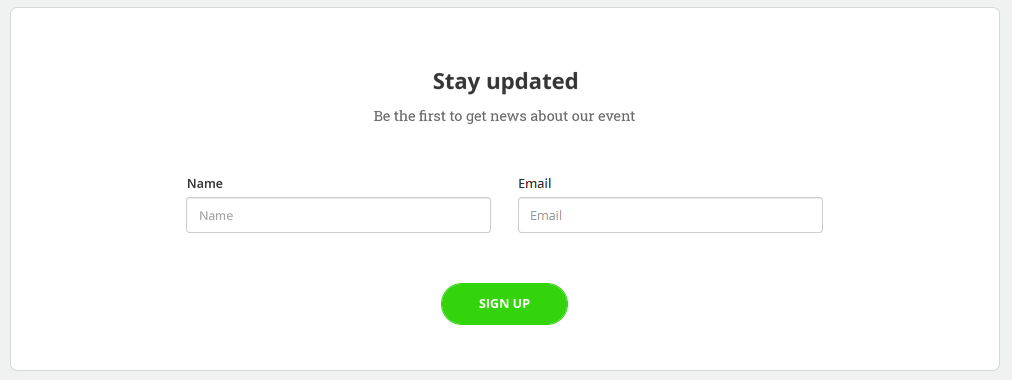
Example of a lead capture area on an event website in Even3
#Even3Tip: Prioritize tools that are easy to use and allow integration with email. It’ll make a big difference later!
2. Define the page’s goal
Every landing page needs one single, clear goal.
So it’s time to ask yourself: What do I want this person to do here?
It could be:
- Download a resource
- Join the waitlist
- Get updates
- Join a pre-registration
But avoid multiple goals! LPs need to be focused on a single action.
3. Build an effective form
The form is the heart of your landing page, since it’s what turns visitors into leads.
But for it to work well, you need to build it following best practices, like asking only for essential information and keeping the filling process fast and intuitive.
It’s also important to store the data securely.
So make sure the data:
- Is being saved in a trustworthy tool
- Can be easily accessed later
- Is protected (especially following privacy and data protection best practices)
If possible, store the form data in an email marketing tool.
That way, once someone fills it out, the lead can automatically start receiving nurturing emails.
4. Create an attractive offer
After the goal, the offer is the most important part of an LP.
After all, why would someone give you their data? What do they get in return? That needs to be clear on your page.
In the context of events, attractive offers can be:
- Lead magnet: e-book, checklist, guide, summary of past editions’ talks
- Exclusive perk: ticket discount, early access to the schedule, complimentary ticket
- Privileged information: being the first to know when registration opens, receiving the full schedule before anyone else
- Exclusive access: supporting materials, recording of a past talk, bonus content
5. Write direct, compelling copy
Speaking of the offer, it’s your copy that highlights its value and what the visitor gets by signing up.
Usually, good LP copy follows a basic structure:
Headline
A sentence that communicates the main benefit, like “Build a powerful network in the X Researchers Community.”
Subheadline
Complements the headline with context — what the offer is, who’s offering it, how to claim it.
Benefit bullets
Throughout the page, list what the person gets by signing up, but be specific.
For example, swap “quality content” for “access to 3 themed tracks with experts from companies like X, Y, and Z.”
CTA (call to action)
The button copy matters more than it seems. So avoid the generic “Submit” or “Sign Up.”
Instead, use first-person action verbs, like “I want my discount,” “Notify me when it opens,” “Download the free resource.”
6. Pay attention to design
Speaking of copy, design also influences conversion.
But don’t worry about being a pro! Just follow a few basic principles, like:
- 📱 Be responsive → it needs to work well on mobile
- 🎯 Highlight the CTA → the button needs to catch the eye
- 🧩 Use visual hierarchy → well-organized title, subheadline, and content
- ⚡ Avoid information overload → use white space and breaks
- 👀 Use strategic colors → contrast helps users spot actions
About the CTA:
- Use action verbs (“Download,” “I want access,” “Join now”)
- Place the button in visible spots
- Repeat the CTA throughout the page if needed
7. Connect it to an email tool
Finally, as mentioned: capturing the lead is just the beginning. After that, you need to build a relationship with them.
One of the most effective ways to do that is through the email they gave you.
That’s why it’s so important to connect your landing page to an email marketing tool, like MailChimp, RD Station, or HubSpot.
In practice, these tools capture and save the data submitted through forms and enable automatic email sends.
That way, collecting and nurturing leads becomes an automatic, simple process, without much human intervention.
An ideal landing page template for events
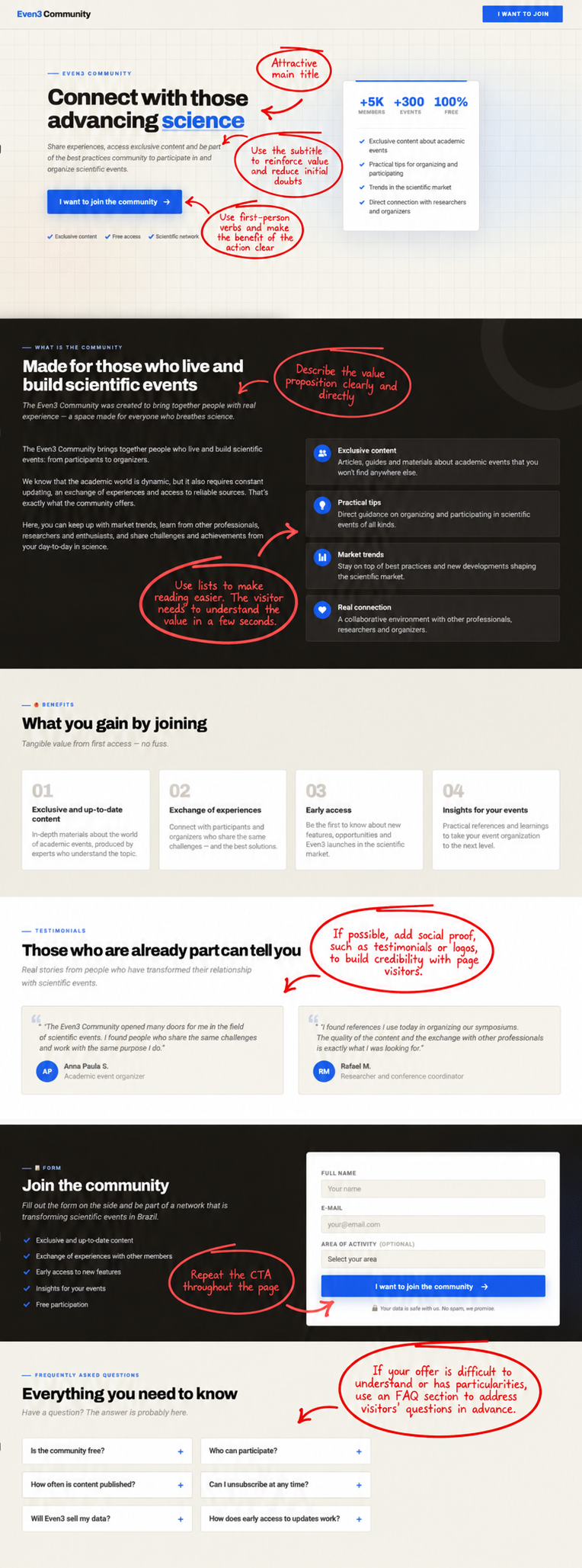
Finally, you now have everything you need to build your LPs!
Ready to get started? One of the simplest ways is to offer valuable materials and attract leads.
But you’ll need to put together quality content that genuinely delivers value. To do that, you can repurpose past talks, turn event content into e-books, and much more.
Just follow a solid marketing strategy — and create a free event on Even3 to put it into practice.



