If you could automatically turn every registration for your event into a real business opportunity, what would that change about your strategy?
With the integration between Even3 and HubSpot, that’s already possible.
Now organizers can connect their event to HubSpot’s marketing, sales, and customer support solutions.
That means, with just a few clicks, you get access to solutions like lead collection, sales funnels, support, and much more.
In this article, I’ll show you everything the HubSpot integration can offer. You’ll understand how it works, practical uses at events, and how to activate the integration right inside Even3.
What is HubSpot?
Basically, HubSpot is an all-in-one software for anyone who wants a customer management solution.
It offers several resources in one place, like a free CRM, marketing automation, AI for support, lead management, and a sales funnel.
In other words, you can track every lead, provide support, know where they came from, what actions they took, and which stage of the sales process they’re in.
That’s why HubSpot is so important for organizers: every registration can automatically become a lead that’s tracked, nurtured, and followed until it becomes a real business opportunity.
How does HubSpot work at events?
To start understanding how HubSpot works at events, check out some practical examples:
1. Nurture registrants automatically
Imagine that every time an attendee confirms their registration on Even3, they enter a HubSpot automation to receive content, tips, reminders, and personalized offers.
That’s exactly what happens in practice. Automatically, every confirmed registration becomes a lead in HubSpot with the information the attendee provided at the time of registration.
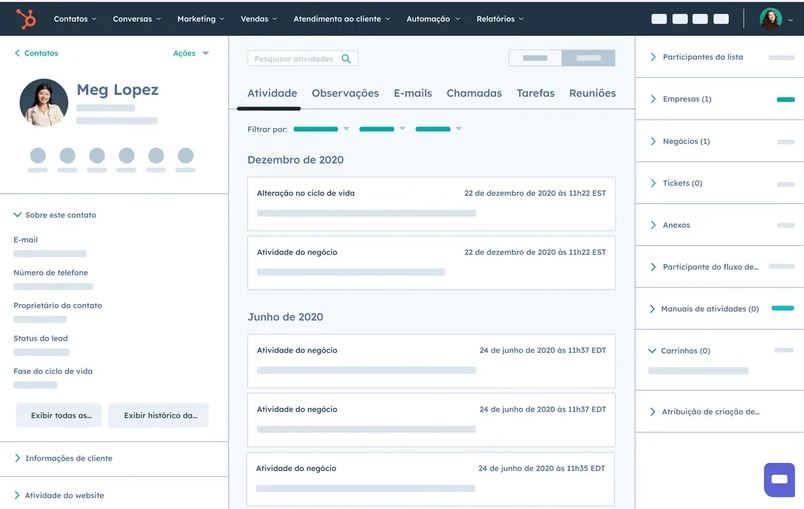
Example of a lead page in HubSpot
2. Create segmented lists for specific campaigns
Speaking of attendee data, you can send all registrants to HubSpot and segment them into lists such as:
- who submitted a paper;
- who confirmed attendance;
- who hasn’t finished registering;
- who bought a specific ticket type.
In short, whatever information you choose to send automatically from the Even3 platform to HubSpot.
Afterward, these lists can be used inside HubSpot’s CRM to create marketing and sales campaigns with much more precision and personalization.
What is a CRM?
Basically, a CRM (Customer Relationship Management) is a system that works like an address book with all the information about your contacts, such as data, interaction history, and sales opportunities for your business.
3. Track event leads through to conversion
If the event’s goal is to generate sales, HubSpot lets you track a lead from registration all the way to final conversion.
That means sales teams can view every interaction in the CRM, adjust their approach, and understand which events bring in higher-quality leads.
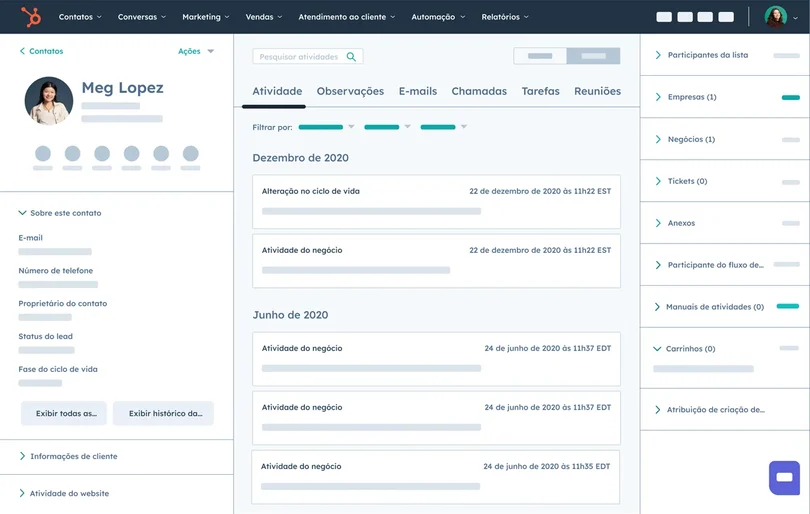
Example of a lead pipeline in HubSpot
4. Connect marketing and sales in a single database
With the integration, the sales team doesn’t need to rely on spreadsheets sent after the event.
That’s because the data arrives automatically in HubSpot, updated in real time, enabling faster action and more efficient strategies.
5. Better qualification of leads coming from events
Events attract very different audiences. But HubSpot helps identify who really has potential.
Through lead scoring, you can define criteria that make a lead more likely to become a customer, such as:
- bought a VIP ticket;
- filled in a specific field on the registration form;
- clicked a pre-event email;
- submitted a paper.
From that on-event behavior, you can define which attendees should be approached by your sales team.
6. Add “talk to a consultant” buttons to your event
As I mentioned, your events are marketing strategies to boost business sales.
So why not use them to draw attention to your product or service?
With Even3 and HubSpot combined, you can talk about your business at strategic moments during the event, offer demonstrations to attendees, send offers by email, and even add a button to the event website.
Just use HubSpot’s meetings tool to create scheduling pages for direct meetings with your consultants.
Then, just share the link in the most strategic places to generate hand-raises from your leads.
7. Measure the event’s real impact on sales
If you run many events a year, combining Even3 for Business with HubSpot centralizes the key data from your events.
Beyond that, the data is shared automatically between the tools, cutting down your work time.
This way, you get more accurate, reliable reports on:
- which marketing and sales campaigns performed best;
- which event generated more conversions;
- which ticket type attracts higher-quality leads, and more.
How to integrate Even3 and HubSpot
The integration between Even3 and HubSpot was built to be fast, intuitive, and fully secure.
All you need to do is go to the Tools menu > Access integrations > Choose HubSpot and log in.
Done! Your attendees’ data is already being shared automatically with the CRM and sales tool.
The information sent includes:
- name and email;
- registration status;
- ticket type;
- or other specific actions that can be requested through Support.
Finally, you can now put everything shown here into practice (depending on your HubSpot plan).
Now it’s time to take advantage of automated processes between tools, marketing campaigns, and advanced sales solutions.
But if you still have questions about how all of this can work in practice, just schedule a free demo with the Even3 team.
Get to know Even3 for Business and take your event management to the next level.