
How to build an event schedule on Even3 is a common question among organizers. After all, this is one of the steps that requires the most care when organizing an event.
That’s because your event’s schedule is what attracts your attendees — it’s through it that you engage people interested in your content and values.
For that reason, relying on an event platform like Even3 helps you focus on what really matters: promoting the best content and finding the right speakers.
That means Even3 can automate the more bureaucratic steps of your event, like organizing time slots and distributing paper presentations. Let’s teach you how to do it:
- What can’t be missing from your event schedule;
- How to build an event schedule on Even3.
What can’t be missing from your event schedule
- Offer appealing activities, like short courses, workshops, coffee breaks, and, of course, paper presentations;
- Show who the speakers are;
- Present the complete schedule, clearly highlighting simultaneous activities;
- Paper presentations can include information like thematic area, submission type, time available for the presentation, and presenters/exhibitors.
How to build an event schedule on Even3
When distributing papers to organize your event’s scientific schedule, keep the following in mind:
1. The type of activity
Is it a class, conference, talk, or paper presentation? Whatever it is, making the activity type clear is essential both to attract new attendees and to better organize your event.
For example, oral presentations need extra care, like evaluation panels and presentation rooms with specific time slots for each paper.
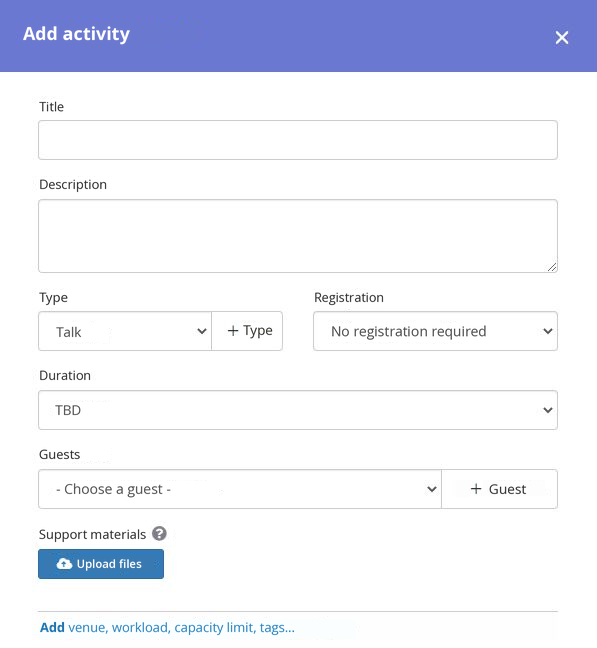
Poster presentations, on the other hand, let you reserve the same space, virtual or physical, for several authors. On Even3, you can handle this division and organize your scientific schedule by setting the locations where activities will take place, the duration of each one, the date, and the time.
2. The presentation’s duration
Speaking of time, it’s a good idea to set a maximum presentation time, especially for oral presentations, since you need to organize the schedule to fit within the event’s overall timeline.
It’s also important to leave a gap between one presentation and the next. This way, authors can prepare their materials and avoid unexpected issues during the activity.
That’s why the Even3 platform automatically calculates and distributes the number of papers that will be scheduled in a session, based on the defined time slot and the presentation time for each paper.
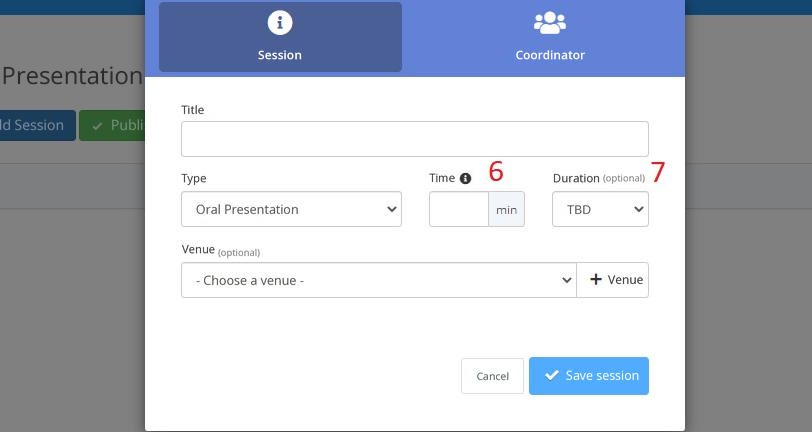
For example, if a session lasts 1 hour, and the presentation time per paper is 10 minutes, the platform will automatically distribute six papers into the session.
Even3 tip: Set the presentation time for papers directly in your event’s submission rules. This way, attendees can plan ahead more effectively.
3. Define the thematic area and submission type
You know that multidisciplinary events usually divide their papers by thematic area, right? So, to keep the presentation schedule as organized as possible, try to divide rooms and presentation times according to thematic areas and submission types.
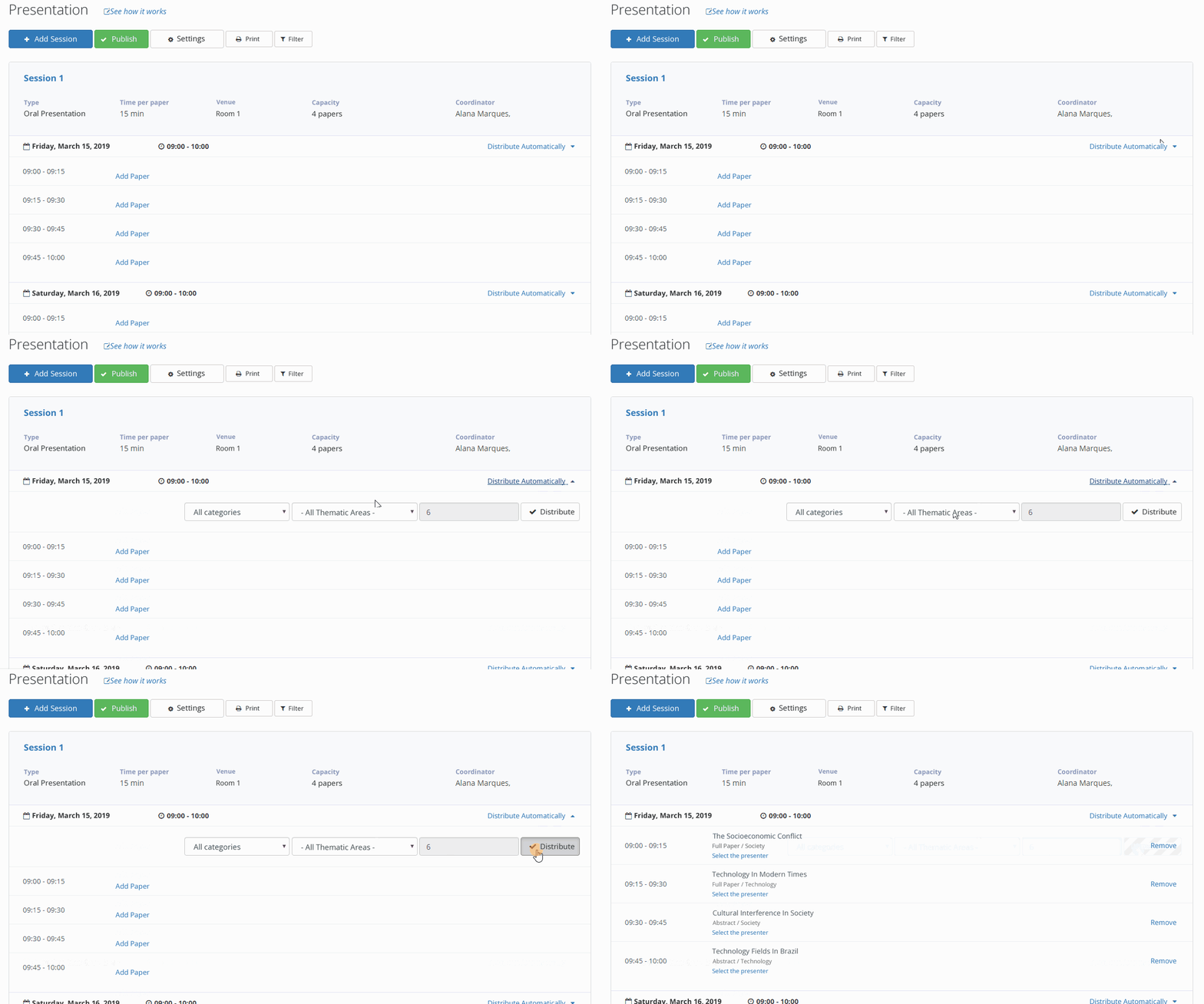
This way, attendees won’t get lost between presentations and will find what they’re looking for more easily. Set these details when registering a new activity on Even3, since the automatic distribution of papers also takes thematic areas into account.
4. Choose area coordinators
With many thematic areas, papers, and attendees presenting, questions tend to come up before, during, and after the event. So it’s a good idea to assign a coordinator for each thematic area.
They’ll be responsible for answering attendees’ questions, guiding them on how presentation spaces are organized, and resolving any unexpected issues on the day of the event.
Coordinators can also be an excellent communication bridge between attendees and the organization in the post-event phase, since many attendees reach out to request statements and certificates proving their presentation.
In fact, “certificates” tends to be one of the topics that generates the most questions and fills up organizers’ inboxes, but with a few good practices, you can generate certificates within minutes of the event ending.
5. Highlight the speaker and add information about them
Still on the topic of key people at your event, the speaker makes a huge difference in your schedule, so make sure to highlight them!
To start, add the speaker’s name to the schedule activity and choose their role at the event. On Even3, you can assign roles like speaker, monitor, support, commentator, examiner, and more.
In this case, you should add the chosen speaker’s résumé, plus extra information about them, since the Even3 platform provides an event website with a dedicated area to present each speaker.
6. Avoid schedule conflicts
It’s impossible for an attendee to present two papers at the same time, right? That’s why you need to be very careful when organizing your event’s scientific schedule and avoid time conflicts.
On Even3, you can enable the “Do not allow schedule conflicts” option so that mix-ups like this don’t happen on the day of the event.
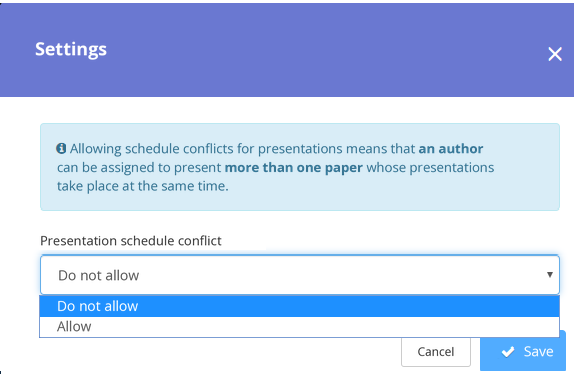
Enable or disable the schedule conflict option on Even3
Finally, with these tips, you can bring your event’s schedule to life. After all, having an event platform available makes it much easier for you and your attendees to receive the event schedule.
So, how about finding more solutions to promote your event and improve your attendees’ experience? Count on a free, online consultation with our event specialists!



