Have you just started paying attention to your registration form?
Then I need to tell you that most of your attendees are already paying attention to it!
Data shows that 60% of people already know they don’t want to fill out forms for more than 10 minutes.
But don’t worry! You can still collect information and even boost your event’s reach efficiently.
In this post, we’re going to teach you the main rules for registration forms. Learn more:
- What is a registration form?
- What to include in a registration form;
- How to create a free online registration form?
What is a registration form?
The registration form is how you collect data from attendees of an event or activity.
It can be physical, but nowadays online forms are the most common — and smartest — choice.
Whether for a workshop, a talk, a street race, or a scientific conference, the registration form is the official way to declare real interest in the event.
That’s why it’s important that it’s easy and quick to fill out.
This way, attendees don’t give up on the interaction and you can keep in closer contact.
Why use an online form?
1. Secure purchase
Depending on the platform you choose, it’s possible to link the registration form to ticket purchases.
This way, you ensure more security in the process, avoid fraud, and make it easier to complete paid registrations.
2. Ease of filling out
With modern phones and browsers, forms are often filled out automatically. That makes the process much faster and smoother.
3. Remote access
Online forms can be filled out from anywhere, at any time. This significantly increases the reach of your online registrations.
4. Data security
Platforms like Even3 keep attendee data secure, in compliance with data protection regulations. Attendees can also edit or delete their information from the platforms whenever they want.
5. Communication optimization
You can use collected emails to communicate with your audience. This way, you can send event reminders, supplementary materials, or even more detailed forms to get to know them better.
6. Task automation
Some online registration form tools, like Even3, automate tasks for free, such as:
- Generating certificates;
- Creating attendance lists;
- Creating QR Codes for check-in.
7. Email marketing
Many systems notify you when an attendee starts filling out the form but doesn’t complete the purchase. This way, you can build email marketing strategies with offers, reminders, and remarketing.
What to include in a registration form: best practices
Ask only what’s essential
The more fields, the greater the chance of drop-off.
To give you an idea: forms with more than 5 questions can already feel too long!
Use standard questions
Prioritize essential data, such as:
- Full name
- ID document
Standard questions, like occupation, are also simple and already give you a base for understanding your target audience.
Later, if you want to collect more data, you can send emails with other forms.
Use form templates
To save time, you can use a ready-made form template and adapt it to your needs.
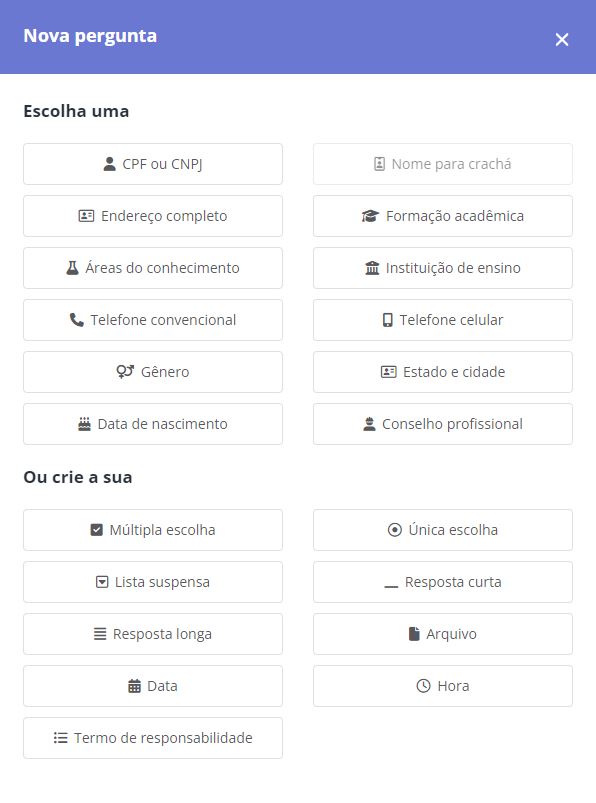
In Even3, there’s even the option to add document uploads to your registration form. With this feature, you can request files more conveniently.
Add a consent checkbox
Respect data protection laws! If you’re going to use your attendees’ data for other purposes, such as email marketing, you need to include a consent checkbox.
It should also state what purposes the data will be used for and ask for authorization.
Test the order of the steps
Have you ever imagined what would happen if your attendees filled in card details first when registering for events? It might be harder for them to give up after that, right? But it might not make a difference either.
To find the right answer, it’s important to test! So, if you’re using platforms that allow it, like Even3, run some tests.
How do I know if my form is good?
Track your abandonment rate. Many attendees give up when:
- The form is too long;
- The interface is confusing;
- Clear instructions are missing.
To track this data, you can use user tracking tools, such as Google Analytics. This way, you can measure the number of people who visit your form page.
Finally, just compare that data with the number of people who confirm registration.
How to create a free online registration form?
Now you probably want to know how to create your form in practice, right?
If you want to know the most popular tools for creating a free online registration form, here they are:
1. Google Forms
Google Forms is one of the best-known tools for creating online forms. So, if you want something basic and free, it’s always an option.
Advantages:
- Free;
- Easy to use;
- Responses are saved in spreadsheets on Google Drive;
- Ideal for those looking for simplicity.
Disadvantages:
- Doesn’t allow secure payment collection;
- Doesn’t automatically integrate with check-in or certificate issuance systems;
- Requires manual data management.
How to create a form in Google:
- Go to Google Forms;
- Click “+ Blank” or choose a template;
- Edit the title and questions;
- Share the link with your attendees.
2. Typeform
Typeform focuses on usability and attractive design.
Advantages:
- Beautiful, interactive interface;
- Great user experience;
- Free plan available.
Disadvantages:
- Advanced features are paid;
- Also doesn’t offer an integrated payment system;
- Requires manual data export.
3. Even3
For those who want to organize an event, Even3 offers a complete solution with an online registration form included.
That’s why the tool is ideal for those looking for professionalism and practicality.
Advantages:
- Customizable website for the event;
- Integration with secure payment methods;
- Automated data collection;
- Support for issuing certificates, managing registrations, and check-in;
- Integrated marketing functions (sending emails, integrations, ads, and more).
Disadvantages:
- Although it offers a free plan, paid events have a 10% service fee on the ticket price. However, it can be passed on to the attendee.
Remember: forms can either boost or hold back the success of your event.
So choose the right tool, apply the best practices we mentioned, and really get to know your target audience.
To make your event easier to organize, always prioritize tools that automate tasks and save your time. Get to know a free and easy-to-use alternative.