Live online streaming has become the reality for many events.
It’s an excellent option, especially for shorter events looking to cut costs involved in organizing, like venue and equipment rental.
Beyond that, doing a live stream is, today, one of the most effective ways to boost a brand’s reputation and engage an audience.
Also known as a live, live video streaming is widely used on channels like YouTube, Instagram, and Facebook.
You’ve probably already watched a stream like this and wondered whether it’s very complex to pull off, right?
Unlike what many think, running an online stream isn’t that hard, and you can reach a good number of attendees, since the content can be watched from anywhere on the planet!
That’s why, in this article, we’ll cover everything you need to know to do a live online stream for events, its main advantages, and which events it’s best suited for.
What is live streaming for online events
Before anything else, to start planning an online event, you need to define three things:
- The type of streaming you’ll use, which can be live, recorded, or videoconference
- The platform or tool you’ll stream the event through
- The equipment needed for a quality stream
Live streaming is nothing more than broadcasting video content over the internet. This streaming can happen either from pre-recorded content or from live interactions.
In live mode, recording and streaming the content to the audience happen simultaneously.
Live streaming at events is an excellent way to present content, spark discussion, and gather online viewers for live interaction.
However, as with other formats, live streams also have limitations and aren’t suited for every kind of event.
Which events is it ideal for?
Live streaming for events is ideal for shorter events with just one activity. For example, a talk, webinar, or class.
Why?
Mainly because, during a live stream, various connection instabilities can happen, along with audio and image problems, for example.
On top of that, it becomes very complicated to organize an entire event schedule, with several activities starting and ending, within a single live stream.
Imagine having to manage communication with remote speakers, all based in their own homes or offices, and making sure they’re all 100% ready to go live?
The work would be huge and the chances of something not going as planned would be high! Notice that even live TV broadcasts have hiccups between reporters.
So, smaller events, with a single talk that also isn’t too long, meaning under 1 hour, are the ones best suited for live streaming.
Advantages of live streaming for events
There are many advantages to doing a live stream, both in terms of humanizing your communication with your audience in the digital space and in terms of generating more sales.
Convenience
Live streaming is very practical since it lets attendees follow your live from anywhere! They can watch it on the bus, at work, or at home, in Brazil or abroad.
On the speaker’s side, it can be done with just a laptop or mobile device connected to the internet, a good connection, and a microphone with good audio pickup. There are also free video streaming tools, which makes life even easier for speakers and organizers!
Visibility
A great advantage of online events is that there are no physical space limitations. That is, you don’t need to rent an auditorium or room with a minimum and maximum capacity to host the event.
At online events, you can welcome as many attendees as you want! This means your event’s visibility tends to be much bigger.
Also, by streaming online on social media, for example, you have the chance to reach even more people beyond those who already follow you.
That’s because, during a stream, the audience can share insights from your content, let others know they’re attending a stream, and, as a result, attract friends to the video. The organizer of the live can, of course, also promote the stream link on other strategic digital channels.
Higher profitability
When you choose to organize a paid online event, and knowing there’s no space limitation, the potential for profitability is greater.
After all, you won’t have costs for space, cleaning, equipment maintenance, coffee breaks, and you can still open the event to as many people as you want!
Real-time interaction
In the digital world, interaction is the key piece of the puzzle — in other words, the most important factor.
After all, in an environment where everyone is connected at the same time and present on the same channel, nothing makes sense without interaction.
A great benefit of live streaming at events is the ability to interact with your audience in real time.
This opens space for people to ask questions, raise points, and chat as if they were face-to-face with you. A unique opportunity, right?
People from all over your state, country, or even abroad, interacting live… That’s the best form of interaction you can offer in the digital space, and the internet knows it!
That’s why social networks like Facebook and Instagram, for example, give so much prominence to the famous “lives” — in this case, live online video streams. Because they know it’s a way to hold users’ attention on that specific channel for a good while.
Interacting is a way to build a closer relationship with your audience. And you, as a person or brand, need to build that kind of relationship. After all, if your goal is to sell more or put your name out there, you need to connect!
On Even3’s online streaming module, interaction is guaranteed.
Credibility
When we think about live streams, we already picture all the preparation happening behind the cameras so everything goes as planned.
Besides conveying trust and credibility, the presenter shows command of the subject and a commitment to staying up to date, in order to pass along reliable information to their audience.
Unlike a pre-recorded stream, what happens live can’t be redone or edited, so it’s extremely important to have authority over what will be shared during the stream. After all, “those who know it, do it live.”
And it’s worth remembering how important it is to always be ready to answer attendees’ questions.
A good tip is to set aside a specific moment in the live to answer attendees’ questions. You can get help from someone to gather those questions so no attendee goes unanswered and ends up dissatisfied.
How to do a live stream
Time to put the live stream into practice!
To do your live stream you’ll need some equipment on hand, like: a mobile device or laptop with internet access, a webcam or camera, headphones with a built-in microphone, and a tool or platform to stream your video live.
If you’re going to use the device’s own camera to record, pay attention to the image resolution quality. Does it let viewers clearly see what you’re going to show?
Some devices might not have adequate settings or might perform poorly, which can end up hurting your video’s sound and image.
Also, don’t forget to charge the device or keep it plugged in. That way, you won’t risk the battery dying during the stream.
Internet
A good internet connection is also necessary. It’s very important to check your provider’s upload speed. You can do this by going to www.fast.com and clicking on more information:
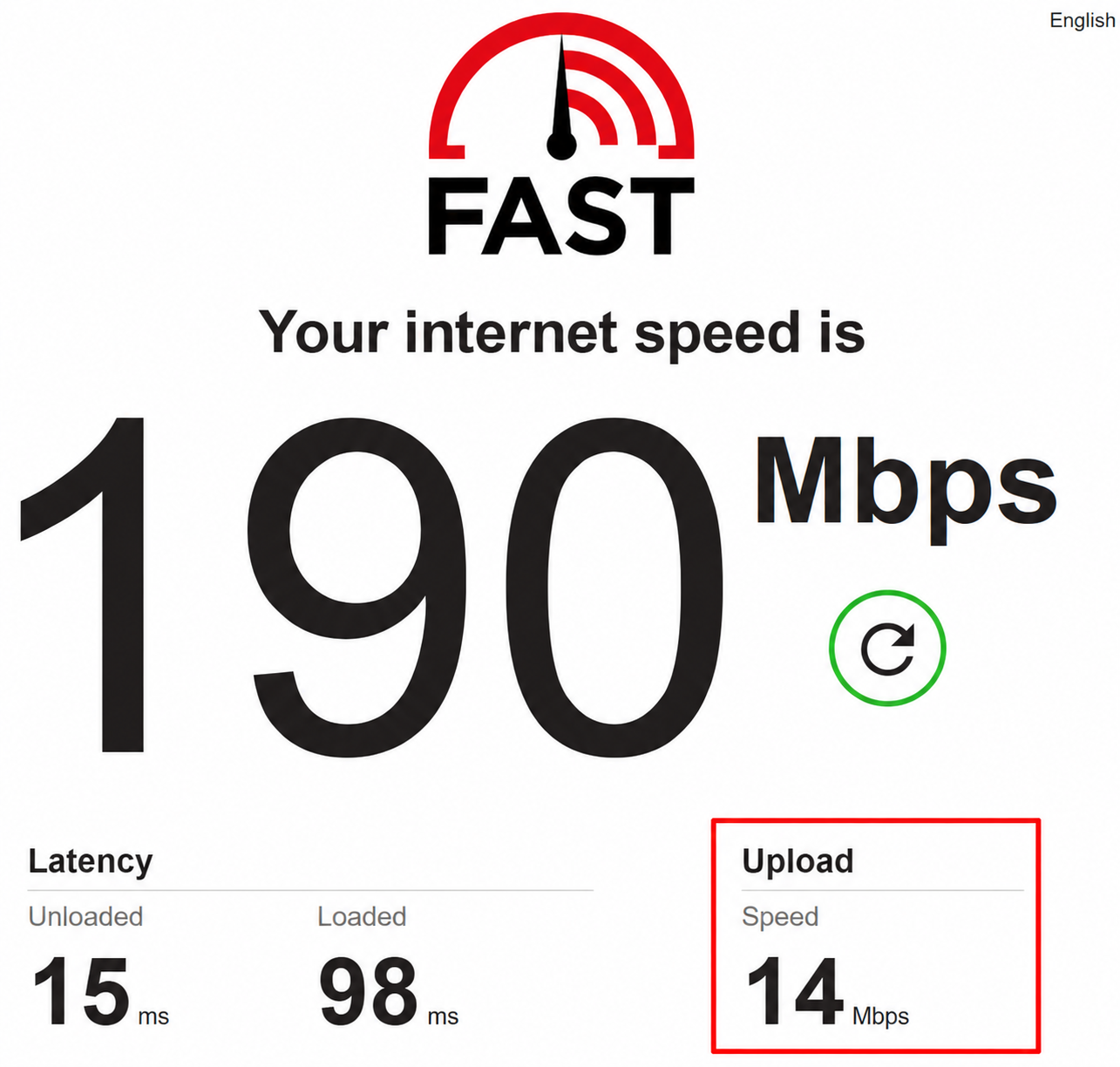
Ideally, you should have a speed of 6Mbps so your video’s resolution isn’t affected, which would hurt attendees’ viewing experience.
It’s also very important to opt for a wired network connection; wireless can work, but it’s common to have inconsistent speeds, sometimes dropping quite a bit.
Another tip is to ask everyone at home to avoid using the internet during the stream. Just imagine you streaming while someone else is watching a movie on Netflix, the movie alone would eat up a good chunk of the house’s internet! As a result, your streaming quality would suffer.
When in doubt, test it!
To do a live stream with more confidence, it’s always good to test everything: equipment, platform, and even run through your script before the talk starts!
Actually, these are tips we recommend for all online events, but especially for those going with live streaming. Since in a live everything happens and needs to be fixed “on the spot,” it’s very important to minimize the chances of errors during the broadcast.
So, when in doubt, test it! Test your video and audio equipment, test mirroring your laptop screen and showing slides. Rehearse your script, invite family and friends to watch a test run of your talk already on the platform you chose to stream live.
Ask them to ask questions on the platform and think about how you’ll answer them: at the end or during the talk? Check your internet connection and also ask for feedback from the audience invited to the test event! This is essential so that, on the day of the event, everything runs perfectly!
Environment
It’s also important to pay attention to the space where you’ll be presenting, whether it’s organized and well lit. A nice-looking setting makes all the difference.
As for lighting, try to work with a balanced environment, meaning not too dark and also not overly bright (it can blow out your image). Always prefer soft, diffused lighting. In other words, light that isn’t aimed at a specific spot. For that, using diffusers can be a good option.
The ideal framing is one that keeps the camera at eye level. To do that, you can use books to prop up the camera or laptop.
Also don’t forget to think about what will be in the background of the image. It’s possible to create a nice setting that conveys credibility and gives the recording a more professional look while spending very little!
How about hanging a piece of fabric in your event’s main color behind you when recording? You can hang it on the wall so it stays stretched out, without wrinkles.
You can include this check of the setting’s details in your test event too, so you’ll know what needs improving before actually starting the stream!
Making adjustments during the live can make viewers uncomfortable.
And let everyone at home and at work know you’ll be live at an event on that day and time. This avoids awkward interruptions.
Tools for live streaming online events
Now that you know how streaming works and how to do it the best way, let’s look at some tool suggestions you can use.
YouTube Live
YouTube Live is one of the main tools used for online streaming. Besides being practical, it lets you stream live video from your phone or computer.
It’s the ideal tool when it comes to reach, since it’s the most-accessed social network in the world.
YouTube Live doesn’t limit the number of simultaneous viewers, which allows more people to find and want to watch your content.
Oh! And you can still count on real-time interaction with your audience, answer questions, and hear feedback. That’s great, since it creates even more of a connection between you and whoever’s watching.
YouTube Live does have a restriction on mobile streaming, though: the channel needs at least 1,000 subscribers. If your channel doesn’t have that, you’ll need to stream from a computer.
Zoom Meeting
Another tool widely used by online event organizers is Zoom Meeting.
Very much geared toward group meetings, Zoom Meeting lets you and your guests interact live through chat and also using the camera. So you’ll be able to see exactly who’s attending and interacting in the stream.
But, unlike YouTube, the free version of Zoom Meeting has some restrictions on the number of participants and the duration of each stream.
Only up to 100 people can join “online meetings,” and the maximum length allowed on the free version is 40 minutes.
Still, it’s a good option for short, interactive streams. It’s worth exploring the free version or, if you prefer, opting for the paid version, which has other features, including one built specifically for webinars!
Now that you know everything you need to do a live stream, how about organizing an event in this format?
Even3 is a complete tool to help you manage academic and scientific events, like symposiums, workshops, and scientific conferences. And now also your online event.
So, what are you waiting for to create yours?



