Have you seen the number of visits to your event’s website grow, but couldn’t turn that into completed registrations?
Maybe a lot of people already know about your event, but do you know how to turn them into registered attendees?
These are common questions for event organizers, but the good news is there’s an effective solution: remarketing.
With this marketing strategy, you can re-engage website visitors, increase registrations, and make sure no one forgets about your event.
Want to know how? Keep reading and find out how to do remarketing for events.
What is remarketing?
If you’ve ever visited a website and then started seeing ads for that same site elsewhere, you’ve already been targeted by a remarketing campaign.
This strategy consists of showing personalized content to people who have already interacted with your website, app, or some other content.
Usually, ads are created on Google or Facebook, but it’s also possible to use emails.
How does remarketing work for events?
Basically, the remarketing technique works through collecting user data, using technologies such as cookies or tracking pixels.
So, when a user visits the event website, that tracker starts collecting information about their behavior.
Later, while they use the internet, specific ads or emails from your event can be shown to them. This will remind them of the opportunity to attend.
This way, remarketing is one of the best digital marketing strategies for keeping your brand present in the minds of potential attendees.
But it’s worth remembering that it’s not just about “following” users online, it’s about providing value.
For example, you can:
- Show content the user missed;
- Remind attendees about deadlines;
- Ticket promotions;
- New attractions at the event.
So always remember: personalization is the key to remarketing! It ensures the content is relevant and sparks interest.
4 practical tips for doing remarketing at events
1. Segment your audience
As I told you, personalization is the key to well-done remarketing!
To start, you can create segmented remarketing lists to target visitors based on their interactions with your content.
For example, you can create different campaigns for people who only accessed the registration page, and for those who left tickets in their cart.
In this case, tools like Google Ads and Meta Ads can help you create even more specific ads.
Then you can use them to deliver the ideal content for each type of audience.
Run tests with your audience segments, update your remarketing lists, and remember not to overwhelm attendees with content.
2. Offer discounts to encourage purchases
Many people don’t register for the event out of indecision or financial concerns.
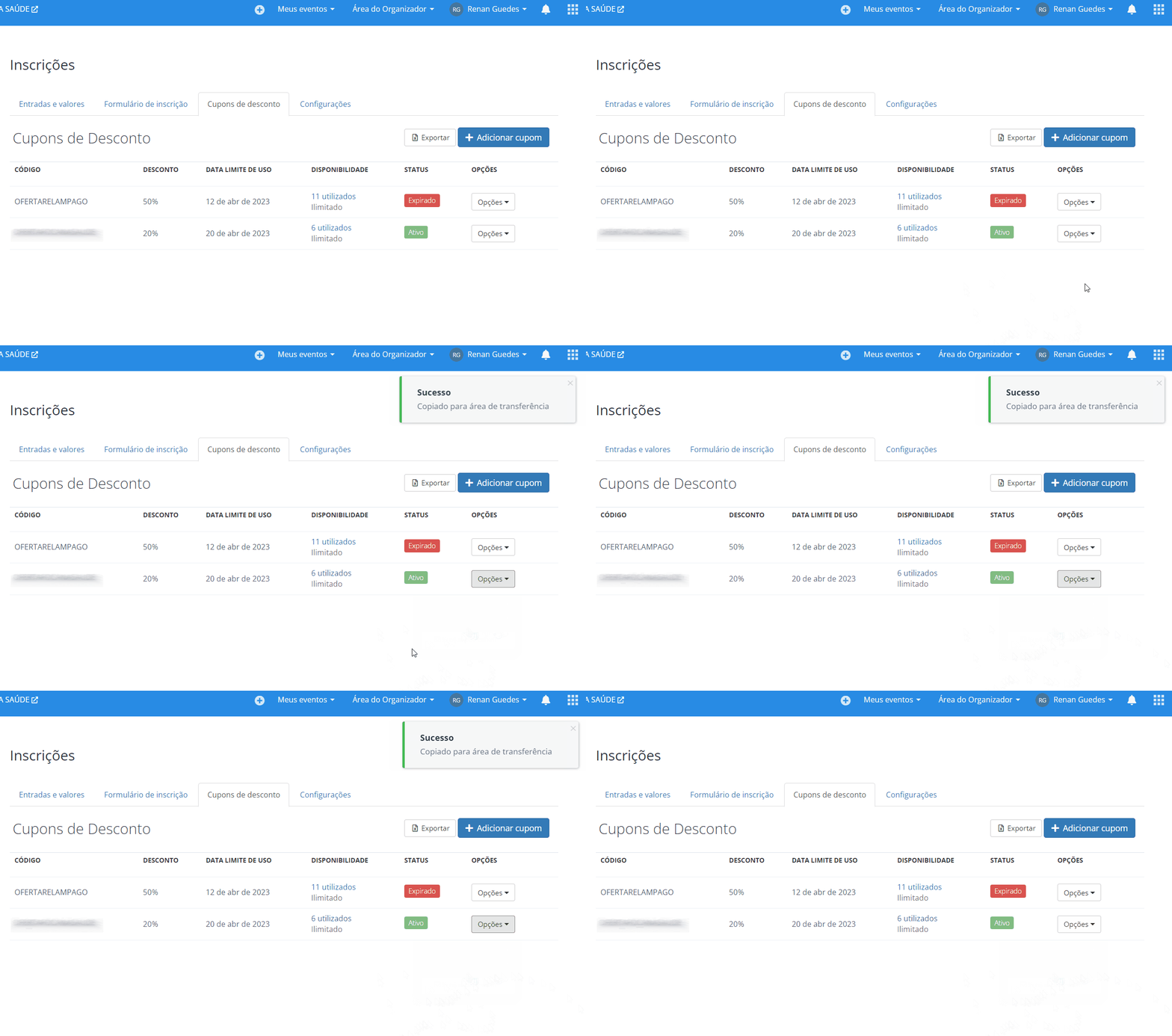
So, creating remarketing campaigns with specific discount coupons can be the final push to secure the conversion.
Just be careful not to make this a frequent practice. Otherwise, your attendees will always prefer to wait to register later.
Use tools like Even3 to create these coupons with limited time and quantity. This will also add a sense of urgency that’s quite appealing for your campaign.
3. Pay attention to the days and times of your remarketing campaigns
You’ve probably already noticed that remarketing is always about data, right?
To ensure the best personalization, check the days and times when your audience is most active.
Ad tools, like Google and Meta Ads, provide this data.
So, correctly set the most active times and days to display your ads.
For example, maybe your audience isn’t active on weekends. In that case, it’s ideal to exclude those days from your campaign schedule so you don’t lose money.
This can directly impact increasing registrations and reducing ad costs.
4. Clean up your remarketing lists
Avoid targeting people who are already registered for the event!
That’s why you should create segmentation lists and choose to exclude these people in Google Ads. This will prevent ads from being shown to that specific group.
An easy way to do this is to access the audience manager in Google Ads, create a new list called “Buyers”, and ask Google not to show your campaign to that segmented list.
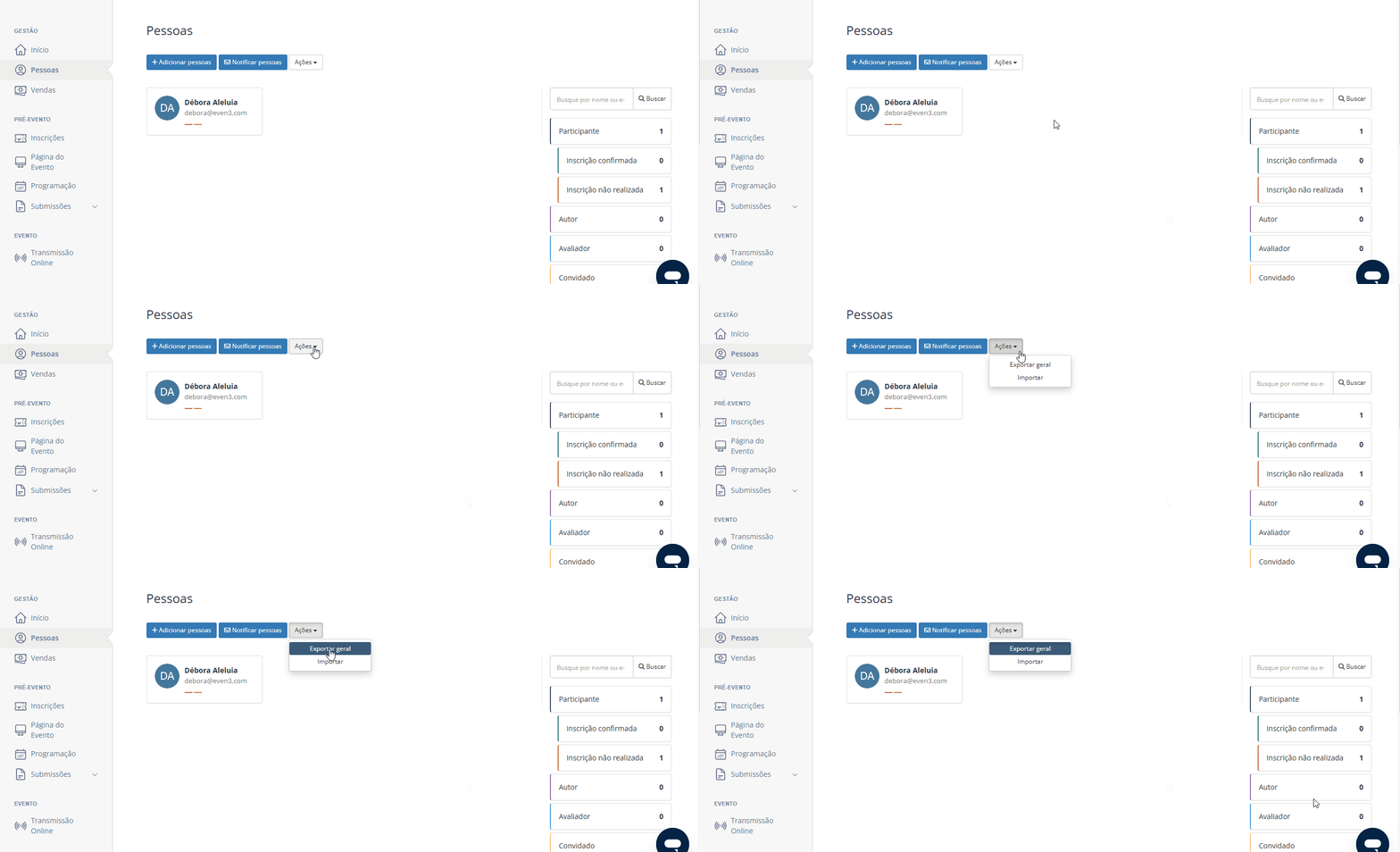
If you’re using event platforms, like Even3, you can export attendee data from the event and quickly create that list in Google.
Finally, constantly test and adjust your campaigns to maximize your event’s financial return.
How to create a remarketing campaign on Google
What is remarketing on Google and why is it important?
Remember I told you that remarketing can be done through ads?
With Google, you can do this with people who have already interacted with your website.
This is essential for events, as it reinforces your brand’s presence and encourages people to complete their registration.
How to do remarketing with Google Ads
First, to create remarketing ads you’ll need two Google tools.
Google Ads, Google’s tool for creating ads, and Google Tag Manager, the tag manager that allows you to create segmented ad campaigns. In other words, remarketing.
So, start by creating an account on both channels.
Now that you’ve created your account on both tools, let’s move on to the settings.
Installing the global tag on your event’s website
The first step to start your campaigns is to set up a global tag from Google Tag Manager (GTM).
This tag needs to be added to your event’s website, since it will capture information and data about the users who visit your site.
In Even3, installing tags on your website is super simple.
Integrating GTM with Google Ads
Then, you’ll need to create a specific tag for Google Ads in GTM.
This way, the data collected on your site goes to Google’s ad tool.
So, in Google Tag Manager, create a Google Ads tag.
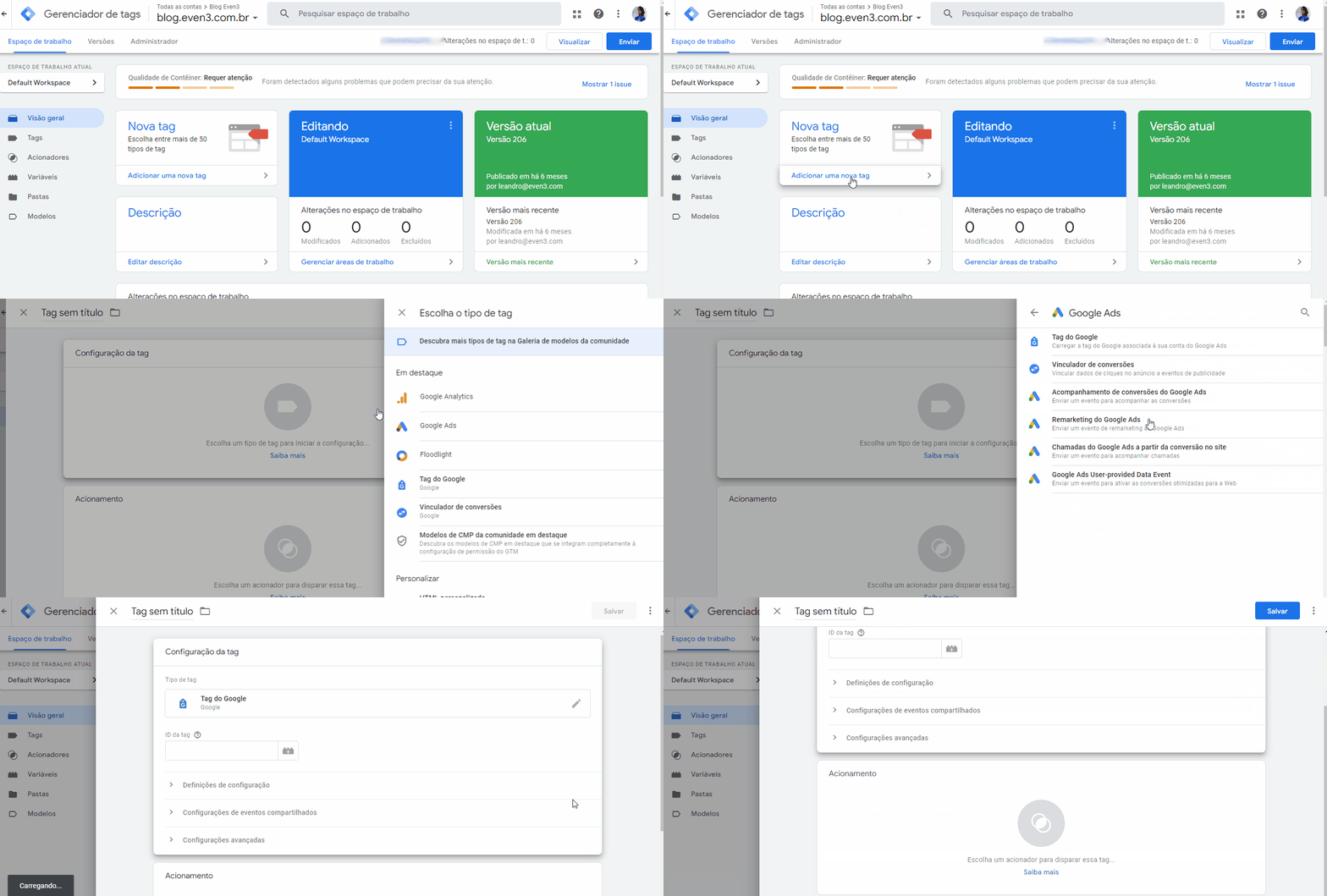
At this point, it’s important to correctly enter the following information:
- Tag ID: Your Google Ads account ID
- Trigger: All pages
Now Google Ads is already capturing data from your website.
Create a Remarketing tag in Tag Manager
To activate Remarketing, go into Google Tag Manager. Then, create a new tag called “Google Ads Remarketing”
With this tag you’ll be able to create remarketing campaign ads in Google Ads.
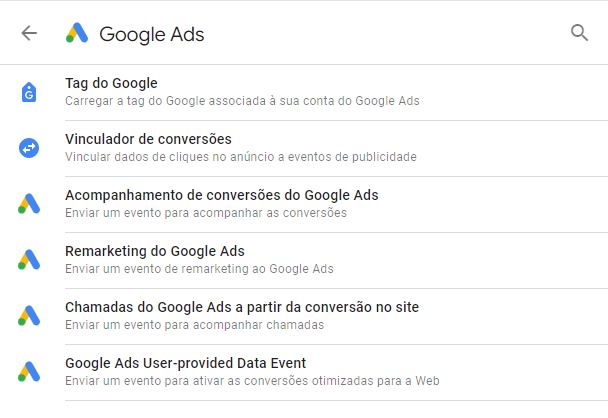
Create a remarketing list
Remember I told you about creating lists to send your ads to the right people? Now’s the time!
After installing the remarketing tag, log into your Google Ads account and create a sales ad.
At this point, set up your campaign by defining the target audience, ad formats, and ideal budget.
To optimize results, use persuasive ads that reinforce the urgency of registering. Also, test different approaches to find out which messages generate more conversions.
How to create an easier remarketing campaign
I know that creating an ad campaign can be a somewhat more complicated way to do remarketing.
But don’t worry if you still don’t feel confident with that strategy! You can start remarketing with email.
This is a free and super simple solution if you use event platforms like Even3.
That’s because the tool has a Notify People feature and lets you send segmented emails to specific categories of people at the event. Including website visitors.
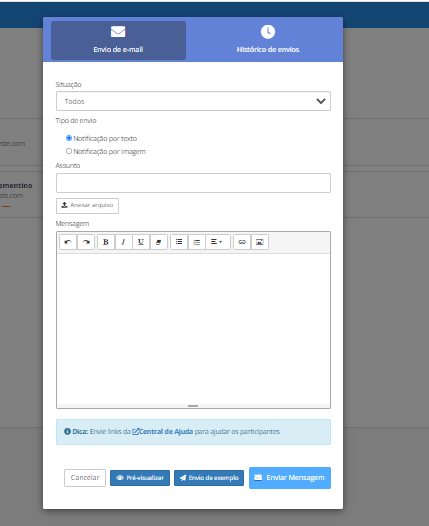
So, all you need to do is:
- Create an email campaign that grabs the attention of the website visitor;
- Write in a personalized, persuasive way;
- Deliver valuable content that makes a difference in your audience’s inbox;
- Maintain constant contact and keep visitors interested.
As a result, of course, you need to promote your event’s website. Including running traffic campaigns for it.
With Even3, you get a website for your event for free and can customize it however you want to attract potential attendees.
So, how about seeing now how all of this works? Get to know Even3.