If you’re already an RD Station customer, you may have noticed a new item among the platform’s integrations: Even3.
This partnership is a strategic move to create qualified lead generation opportunities by combining the most widely used marketing and sales automation software in Latin America with the leading event management platform in Brazil.
In practice, your marketing team can now weave events into your business strategy more easily.
Or, if you’re an organizer, you can turn your events into machines for generating leads and building engaged communities.
Want to know how it all works in practice? Read on:
- What is RD Station?
- 7 ways to use RD Station and Even3 together
- How to integrate Even3 with RD Station
- Advanced tips to get the most out of the integration
What Is RD Station, and Why Is It So Widely Used in Marketing and Sales?
RD Station is one of the leading marketing automation and CRM tools in Latin America.
Basically, it’s used to capture the contact information of people interested in a service or business and turn them into loyal customers.
That’s why it offers two products:
RD Station Marketing
This product focuses on automating campaigns, flows, and lead nurturing.
With it, you can build landing pages, send segmented emails, track metrics, and build automatic communication journeys.
RD Station CRM (Sales)
On the other hand, RD Station CRM is built for the sales team.
For those who don’t know, CRM stands for Customer Relationship Management.
So this is RD’s product that helps manage the sales funnel, track opportunities, measure results, and automate stages of the negotiation process.
With these two solutions, RD Station has become synonymous with efficiency, integration, and scalability.
Now, with Even3, those same advantages apply to the world of events too.
7 Ways to Use RD Station and Even3 Together
Wondering how everything we just told you about RD applies to events?
There are several ways to use it. For example, you can use RD Station to keep engaging with your attendees even after the event ends.
Or you can use events to capture leads for your business and manage the relationship with them in a more automated, intelligent way.
In every case, combining Even3 and RD Station eliminates manual work for your marketing team.
It also gives you access to technologies that help you build more targeted, more complete marketing campaigns.
Let’s look at some examples:
1. Automatically Sending Registrants to RD Station
One of the biggest challenges for large companies is finding people interested in the products or services they offer. But events are a golden opportunity!
At events, you already know you’ll find people curious about the topic related to your product. Now you just have to build the desire for it!
For that, all you have to do is use the RD Station integration with Even3.
That way, whenever someone registers for an event on Even3, that attendee’s information (like name, email, ticket type, and more) is automatically sent to RD Station.
This means you don’t have to export spreadsheets and manually import contacts.
Then, just use RD’s tools to build segmented marketing campaigns and turn attendees into customers.
2. Smart Segmentation Based on Even3 Data
As mentioned, combining RD Station with Even3 lets you use information generated at the event to segment your audience and build increasingly targeted marketing campaigns.
For example, imagine an international event. How do you make sure attendees receive segmented email marketing in their own language?
With the Even3 integration, data about attendees’ language becomes tags and smart lists in the tool.
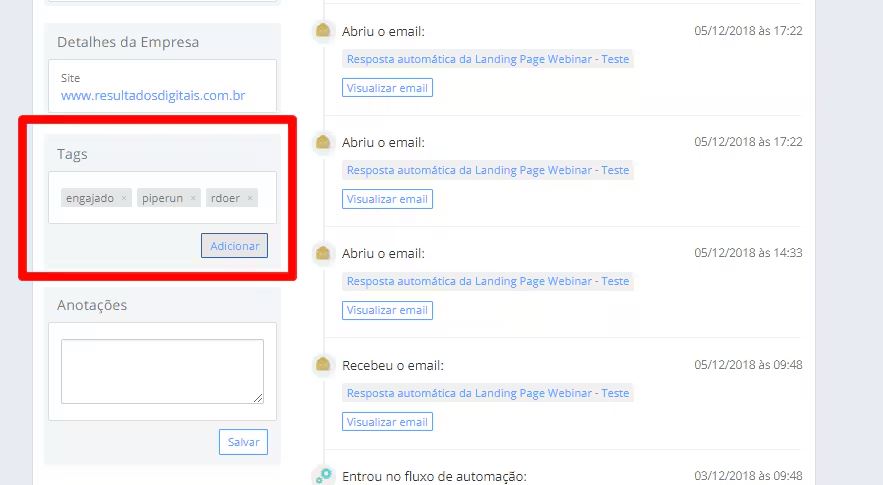
This way, you can create specific contact groups and send emails that take each attendee’s culture into account.
🎯 As a result, they become more engaged and more likely to come back for future editions.
3. Automating Relationship Journeys Before and After the Event
With data flowing automatically from Even3 to RD Station, it’s easy to create automated communication journeys.
This way, RD Station sends messages at the right moment, based on the attendee’s actions on Even3.
For example, this lets you send emails whenever attendance is confirmed, when a paper is submitted, and much more.
4. Identifying Qualified Leads With Lead Scoring
Another benefit of the integration is the ability to apply lead scoring using engagement data from Even3.
In practice, lead scoring means assigning points to attendees who are more likely to close a deal.
For example, RD Station can assign different scores based on attendee behavior, such as submitting a paper or registering for specific activities.
Imagine a lead submitted a paper at the event. Because of that, they may be more likely to later buy the published collection of papers.
So they’d get a higher score and be automatically routed to the sales team in RD Station CRM.
This way, sales can focus their efforts on the most engaged contacts, with the highest chance of converting.
5. Automatic Opportunity Creation
When an attendee shows high interest, the integration can turn that action into a business opportunity inside RD Station.
For example, if your event sells VIP tickets, the contact who buys one automatically enters the sales funnel with their status and information already filled in.
💡 The benefit is clear: the sales team can act quickly at the right moment, without losing hot leads due to missing records.
What’s more, the sales funnel stays updated in real time, reflecting the event’s actual performance.
6. Re-Engagement Campaigns
The partnership between Even3 and RD Station also makes it easier to re-market to past attendees.
There are several possibilities here, like building landing pages to capture people interested in future editions of the event, creating campaigns for past attendees, and sending post-event emails.
For example, after the event, you can send promotions or discount coupons for future editions to attendees who bought a specific ticket category.
This ongoing communication increases the value of the relationship and turns the event into a starting point for future business opportunities.
7. Using Event Data to Optimize Campaigns
Finally, the data from both tools will help you better understand your audience and optimize your marketing campaigns.
With this information, you can identify who your audience is, which content performed best, and where it makes sense to invest more.
Ultimately, the integration becomes not just a bridge between platforms, but a strategic tool for improving your event’s overall marketing and sales performance.
How to Integrate Even3 With RD Station
Now it’s time to put these ideas into practice! Just follow these steps:
- Log in to your Even3 account and go to the organizer area;
- Go to Tools > Integrations and find RD Station;
- Log in with your RD Station account to authorize the connection;
- Set up the fields you want to send, such as name, email, ticket type, etc.;
- Save and activate it. That’s it — your integration is now live!
If you still have questions, you can rely on Even3’s Help Center for support.
Then you’ll be able to automate your event’s marketing, reduce manual tasks, and keep your data always up to date on both platforms.
Advanced Tips to Get the Most Out of the Integration
Before you go, want to squeeze even more value out of the connection between Even3 and RD Station? Here are some best practices:
Segment Your Contacts
As mentioned before, it’s a great idea to create lists that split your contacts by category — for example, speakers, exhibitors, registrants, VIP guests.
This helps you personalize campaigns and increase open and conversion rates.
Use Auto-Fill Tags
Create custom tags in RD that are automatically filled in with data from Even3.
For example, attendee name, event name, ticket type, etc.
In your emails, you can combine these tags to write quick, yet still personal and eye-catching copy.
Use Multiple Channels
Don’t limit yourself to email. If possible, use RD to send SMS, and also take advantage of other Even3 features like Notify People and the event app.
But remember not to flood attendees with messages. They should be well integrated, without overwhelming your audience.
Automate Smart Flows
Build automatic flows in RD Station based on registration status. For example:
- Registered → Sends a welcome message
- Confirmed → Sends a reminder
- Post-event → Sends a survey and certificate
These automations keep your audience engaged without any manual effort.
Track Results in the CRM
If you run events regularly, use RD Station CRM to track the customers who came from your events.
This makes it easy to know how many opportunities came up and how much financial return each event generated.
Combine Integrations With the Even3 Empresas Plan
Speaking of frequent events, do you have a big-picture view of the results they bring to your business?
By integrating RD and Even3 Empresas, that becomes possible!
With this plan, running multiple events throughout the year becomes simpler and more automated.
After all, you’ll be able to:
- Share event management with your whole team in one place;
- Create a portal featuring all of your company’s events;
- Track the financial results of your events in a complementary way, on both Even3 and RD Station;
- Automatically integrate the tools you already use in your business with your events;
- Thoroughly analyze the results of your marketing campaigns, and much more.
Have you thought about how much less manual work your events could involve?
Talk to an Even3 consultant for free and see how this can work specifically for your business.