If you want to learn more about ads, you’re probably looking to boost the promotion of your event, right?
After all, securing a good number of attendees is one of the biggest challenges organizers face.
And in that scenario, paid traffic is a powerful strategy for reaching the right people at the right time.
But is it worth it for your event? The answer is: it depends!
To make this investment, it’s ideal that you know a bit more about what paid traffic is, how it works, and how to apply it in practice.
In this guide, we’ve put together everything you need to know, with simplified concepts and tutorials. Keep reading to learn more.
What is paid traffic?
Simply put, paid traffic is when you invest money so people arrive at your event’s page through ads.
In other words: instead of waiting for your audience to find you organically through search or social media, you “pay” to appear in front of them. Whether on Google, with banners on websites, on Instagram, Facebook, or even as a video on YouTube.
Plus, you can choose a specific audience to target. That way, you show up for the people with the most potential to register for your event.
How does paid traffic work?
Basically, paid traffic works as follows:
- You define who you want to reach (age, interests, location, occupation, etc.)
- Create an attractive ad
- Set a budget
- The platform displays your ad to the chosen audience
You can pay by:
- Click (CPC)
- Impression (CPM)
- Conversion (like a registration)
But don’t worry! If it’s still hard to understand, keep reading and we’ll explain it all.
Paid traffic or organic traffic: what to choose for events?
Before talking about how to do paid traffic, it’s important to understand the difference between the two types of traffic.
Organic traffic
- Long-term result
- Depends on SEO and consistency
- Doesn’t require direct investment
- Takes longer to generate results
- Ideal for established brands or those looking to establish themselves
Paid traffic
- Immediate results
- Precise audience targeting
- Full budget control
- Scalable as needed
- Perfect for fixed dates or one-off promotions
Is it worth investing in paid traffic for events?
Now that you know the difference between organic and paid traffic, it’s worth investigating whether the financial investment is worth it for your event.
In short, both strategies produce results, but paid traffic is more immediate.
Plus, it lets you know exactly how much money you’ll invest and for how long.
So, if you have budget for this type of marketing, it’s worth starting to invest right now.
But remember: organic traffic builds authority and stability for your event over time.
So don’t discard that strategy entirely — instead, balance your investments according to your goals.
Key paid traffic concepts
Alright, you’re ready to create your paid traffic campaigns. Do you know what that actually means, though?
Before starting them, get familiar with the main paid traffic concepts:
- Campaign: a set of ads with a specific goal (like generating registrations or website visits)
- CPC (cost per click): the amount paid each time someone clicks your ad
- CPM (cost per thousand impressions): the amount paid per thousand ad displays
- CTR (click-through rate): percentage of people who clicked after seeing the ad (measures how attractive it is)
- Conversion: the desired action, like a registration for the event
- Target audience: the group of people you want to reach based on interests, profile, and behavior
- Remarketing: a strategy to reach people again who have already shown interest in your event
Types of paid traffic campaigns for events
When you create your ads, you’ll need to define the campaign’s objective. Here are the main ones:
Awareness campaigns
Ideal for introducing your event to your audience. These are usually images or banners that appear in social media feeds or on Google partner sites.
The goal here is to make people aware that your event exists. That’s why it’s a great campaign type for the start of your promotion.
Traffic campaigns
Direct people to your event’s registration or ticket-sale page. These are the most commonly used in the middle of the funnel.
Conversion campaigns
Focused on generating registrations and sales. They require a tracking pixel installed on the event’s website, but deliver the best results.
Remarketing campaigns
Target people who have already visited the event’s page but didn’t complete a purchase. They’re very effective for winning back undecided visitors in the final days of sales.
Main paid traffic platforms
You can run paid traffic on different ad platforms.
But it’s worth remembering: there’s no single, perfect platform! The choice, of course, will depend on where your audience is and the type of event.
That’s why it’s important to know your persona and your platform options:
- Google Ads: Appears when someone searches for your event’s name or topic. High purchase intent;
- Instagram Ads: Visual and dynamic formats. Excellent for events with strong visual appeal and younger audiences;
- Facebook Ads: Powerful targeting by interests and behaviors, similar to Instagram;
- YouTube Ads: Videos shown before other content. Ideal for events with impactful trailers or teasers.
How to run paid traffic for events?
How to run paid traffic on Instagram
Instagram is one of the most popular platforms for promoting events. And creating an ad there is simpler than it looks. Here’s the basic step-by-step:
1. Access the Meta Ads Manager
Through the Facebook Business Manager, you can manage ads on both Facebook and Instagram. Create a free account if you don’t already have one.
2. Choose the campaign objective
For events, start with “Traffic” (get more visitors to your site) or “Conversions” (get more purchases on your site).
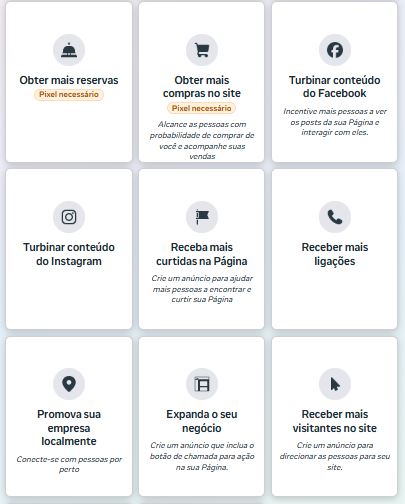
Meta Ads Manager screen
3. Create the ad creative
Use attractive images or videos with the event’s name, date, and a clear call-to-action button, such as “Get your ticket”.
4. Define the audience
Set location (the event’s city), age range, interests (e.g., “entrepreneurship,” “technology”), and relevant behaviors.
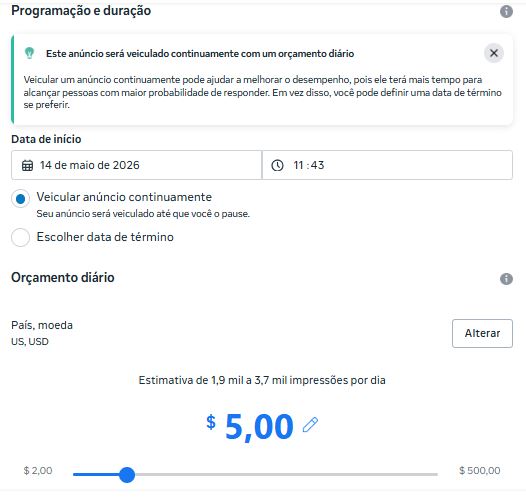
5. Set the budget and publish
Start with small amounts (around $5 to $10 per day) to test. After seeing what works, gradually increase your investment.
Tip: Always direct Instagram traffic to an optimized landing page, not to your profile.
You can create a landing page or event website, as long as it has clear information about the event and a highly visible button to complete the action you want from the ad.
How to run paid traffic on Google Ads
While Instagram captures people who weren’t already searching for your event, Google Ads is powerful because it reaches people who already have intent — they searched for the topic.
Here’s how to start advertising on Google Search:
1. Create a Google Ads account
Go to ads.google.com and create your account for free with your Google email.
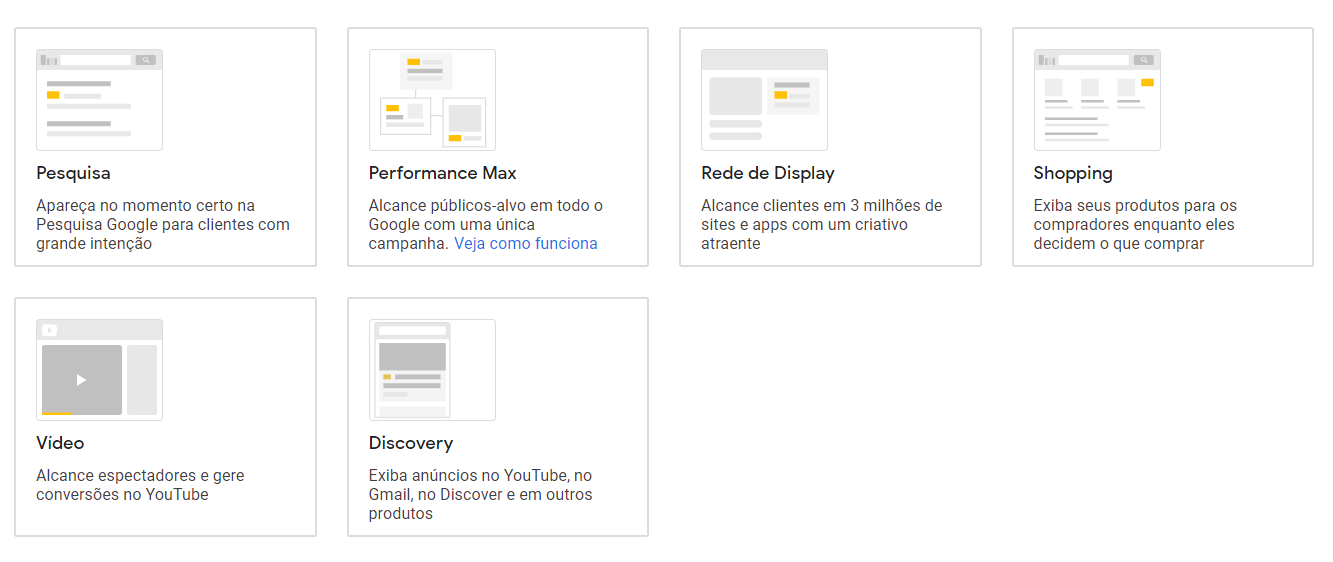
2. Choose “Search Campaign”
For events, the most efficient type is the search campaign. That means your ads show up when someone googles terms related to your event.
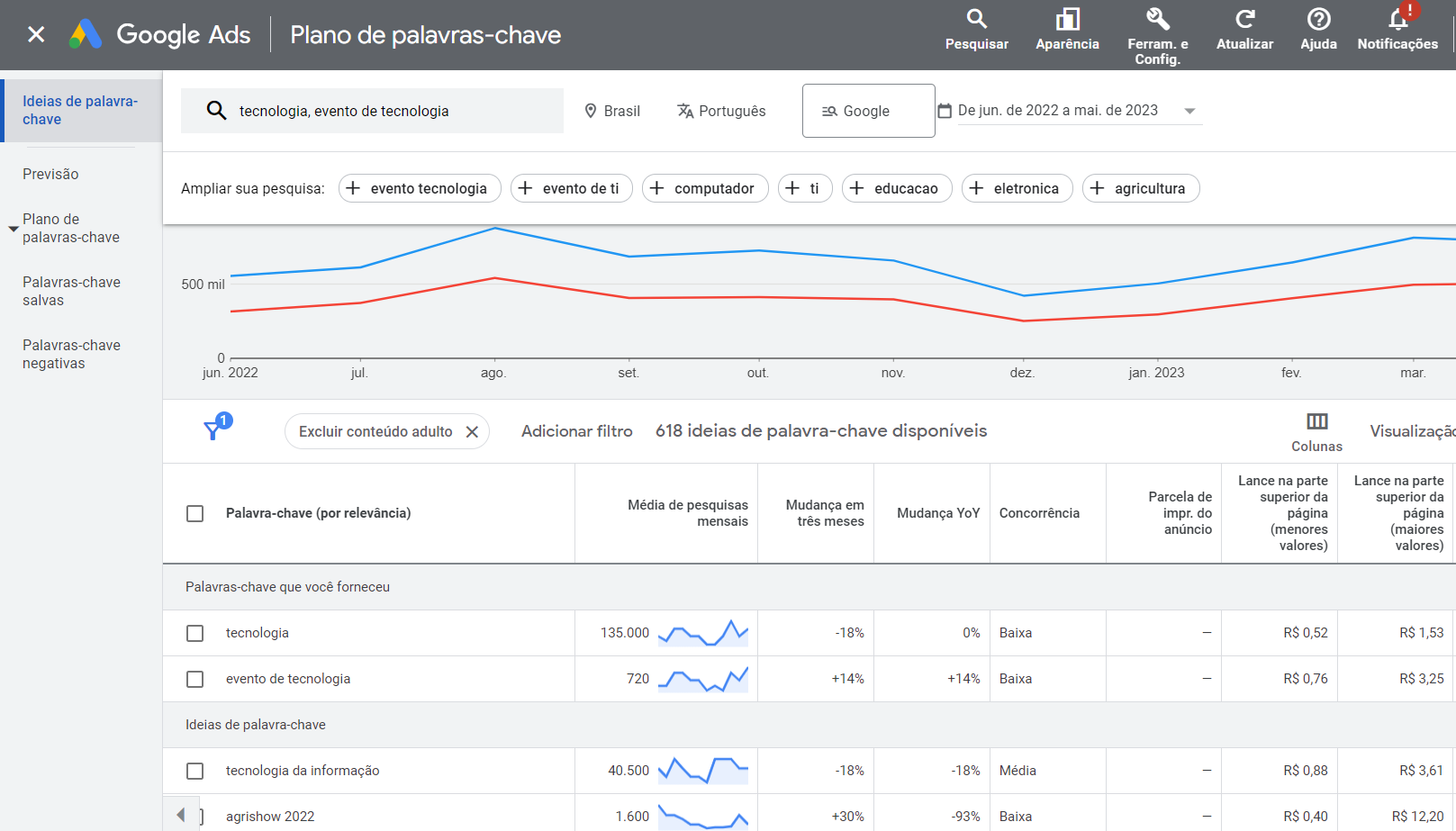
3. Research the right keywords
Use Google’s Keyword Planner to find terms your audience searches for. For example: “medical congress São Paulo 2026,” “startup event,” and other related terms.
4. Write the ad copy
Create direct headlines with the event’s name and unique selling point. Include the date and a call-to-action like “Register now” or “Limited spots”.
5. Monitor and optimize
Track results daily during the first few weeks. Pause keywords that consume budget without generating qualified clicks, and improve your campaigns using Google’s insights.
Best practices for paid traffic beginners
Before you start investing, a few practices will make all the difference so you don’t waste money and get better results from the start:
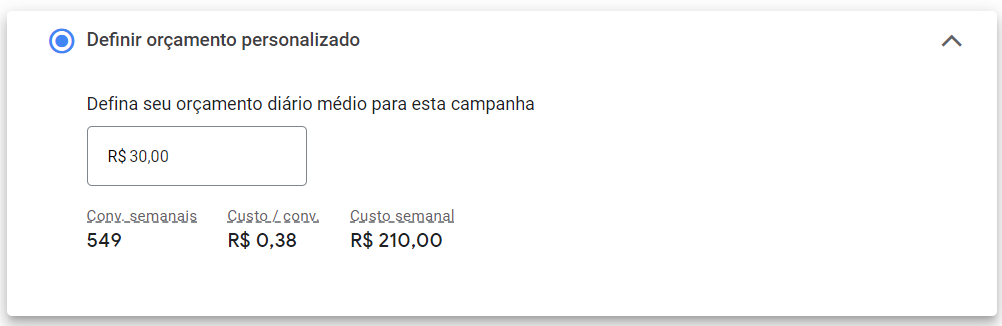
Start with a small budget and test
Don’t invest your entire budget at once! First, run smaller campaigns to understand what works with your audience before scaling up.
Set a clear goal before creating any ad
Do you want registrations? Clicks on the page? Downloads of a material? Watch out! Campaigns without a clear objective tend to spend more and deliver less.
Segment your audience carefully
The more specific your audience, the more efficient your ad will be. So don’t try to talk to everyone — only to those who are genuinely interested in your event.
Consider hiring a paid traffic manager
If your budget allows, a traffic manager is a professional specialized in optimizing campaigns. They can be a great ally for larger events and can even help you save money with better-targeted campaigns!
Have a good event website: it’s the foundation of everything
There’s no point investing in ads and sending people to a confusing, slow, or unreliable page.
Your event’s website is the final destination of all the traffic you generate. That’s why it needs to be ready to convert visitors into registrants.
In other words, clear information, professional design, a visible registration button, and fast loading are essential.
In short: paid traffic without a good landing page is like putting an amazing sign in front of an empty store. The ad attracts, but the site is what converts.
If you want to boost your results with paid traffic, the next step is to make sure your page is ready to convert.
With Even3, you can create a complete website for your event with an online registration form, automatic translation, secure ticket sales, and much more.