
Arrival at the event is the showcase that reveals what the attendee can expect in the hours that follow. So imagine being welcomed with little support, lots of questions, and huge lines… That ruins everything!
After all, attendee support is the part of the event that no one puts on the schedule, but that everyone notices.
When it works, people move around calmly, find the rooms, and leave with a good memory. When it fails, a ten-second question turns into a twenty-minute line.
That’s why support on event day makes a real difference in how attendees perceive the value of your event. There are many ways to put this into practice, whether with a team or with technologies that are trending in the market.
Want to know how to do it? Learn more about:
- What is attendee support?
- Why does it matter for the event?
- Step-by-step guide to organizing attendee support on event day
- Most common questions at different types of events
- Technologies for attendee support
- How to know if support worked and how to improve it?
- How many people should I hire?
What is attendee support
Attendee support is the entire structure you set up to answer questions, solve problems, and guide the people at your event (before, during, and after).
The logic is the same as customer support at any company. There’s a person with a question, a channel to ask it, and someone prepared to answer.
The difference is timing: on event day, almost everything is urgent. No one waits 24 hours for an answer about which room the next talk is in.
That’s why support at events needs three things:
- Visible channels, that attendees find without searching;
- Ready-made answers for recurring questions;
- Prepared people for whatever goes off script.
Why attendee support matters
An unresolved question becomes a bad impression
Attendees don’t judge your event by the cost spreadsheet or the catering negotiation. They judge it by what they experienced. A poorly explained line at check-in weighs more on their memory than the quality of the coffee.
Support turns organization into a warm welcome
A well-organized event impresses. But an event with good service makes people feel welcome. Basically, the difference lies in small, humanized gestures: someone who answers your question before it’s even asked, who offers help, and solves problems quickly.
Whoever was well served comes back
A satisfied attendee registers for the next edition, recommends the event, and leaves good comments on social media. That’s the cheapest marketing there is. And it starts with a human connection in the service provided.
Support generates insight for the next edition
Every repeated question is a warning sign. For example, if a lot of people asked where auditorium 2 is, the signage failed. Or if the questions were about certificates, the prior communication wasn’t clear.
How to organize attendee support: step by step
1. List the questions before they come up
First of all, it’s important to understand that your support needs to be proactive.
In other words, you should answer attendees’ questions before they ask them. This makes them feel welcomed and well received.
So, start with the attendee journey and go through each stage: registration, payment, confirmation, arrival, check-in, activities, breaks, closing, and certificate.
At each stage, ask: what might this person not understand here? You’ll quickly arrive at a list like this one:
- How do I check in? Do I need to bring ID?
- Where’s the room for my activity?
- My name is wrong on my badge, now what?
- Is there Wi-Fi? What’s the password?
- When does the certificate come out?
- Is lunch included?
- Does the event have wheelchair accessibility?
This list is the foundation for everything that follows.
2. Turn the list into an event FAQ
FAQ stands for Frequently Asked Questions. Basically, it’s a page that gathers the most common questions with short, direct answers.
Build your event’s FAQ following these rules:
- One question per block, written the way attendees actually phrase it;
- Answer in up to three lines, with the key information up front;
- Order by frequency, not by topic: what’s asked most comes first;
- Update it during the event, because new questions always come up.
Afterward, you can publish this FAQ on the event page, send it by email, or create a fixed section in the app.
3. Bring everything together in a help center
A help center is the single address where attendees find any information about the event.
Like the FAQ, it can be a web page, a tab on the event site, or a section inside the app.
There, the information is more detailed. For example, it contains the FAQ itself, an event map, contact channels with hours of operation, and important step-by-step guides for the event, such as check-in and how to get the certificate.
One detail makes a difference: keep the same link from start to finish. If the address changes with every email, attendees give up looking for it.
For example, Even3 uses its own Help Center with an area dedicated to attendees. This way, questions about registration, certificates, and platform access are resolved without going through your team.
What’s the difference between an FAQ and a Help Center? What should you do?
Ideally, both! Basically, the FAQ gathers only the most frequent questions. In other words, it’s a summary of the Help Center.
The Help Center, in turn, contains everything else: step-by-step guides, screen recordings, and so on.
Your event may not need that level of detail, so the FAQ alone might do the job — but it’s important to stay attentive to attendees’ needs.
4. Choose your channels and define who answers what
Imagine handling questions coming in through Instagram, WhatsApp, the app, and the event website all at once. There’s no way to respond to and keep track of all of them!
So, choose a few support channels and take good care of them. For example:
- In-person information desk, always in the same spot, clearly signposted;
- Roaming staff with an ID badge or branded shirt, to solve questions right where they come up;
- Event chatbot, for those who prefer not to leave where they are;
- Email, for matters that can wait, like invoices and certificates.
A good practice is to write down who answers each type of question and make it clear across all attendee contact channels, along with access to the Help Center and FAQ.
This way, attendees can find the right place to get help instead of flooding another channel with questions that will take longer to be answered.
5. Prepare the team with information, not improvisation
The support team usually arrives on the day. They need quick context. Give each person:
- A printed or mobile FAQ;
- A venue map and the schedule with times and rooms;
- A phone number to call in case of an emergency;
- Three behavior guidelines: greet people, listen until they finish, and never leave attendees without a next step.
Hold a twenty-minute briefing before opening. It’s the highest-return investment of the day.
6. Tackle known friction points
Some problems repeat at almost every event. Solve them in advance:
- Check-in: more than one service point and QR code scanning to speed up the line. Even3’s check-in works through the app, with self-check-in kiosks and offline mode for when the internet is unstable.
- Signage: signs at eye level, with room names matching exactly what’s on the schedule.
- Wi-Fi: password visible on posters, not just in email.
- Certificate: explain the timeline and where to get it before people ask.
- Accessibility: share accessible routes, adapted restrooms, and communication support resources in advance.
7. Record everything that was asked
Also ask the team to log questions in a simple spreadsheet or a phone form: question, time, and location. At the end, you’ll have an accurate picture of where the event confused people.
This record feeds the FAQ for the next edition and helps decide where to invest.
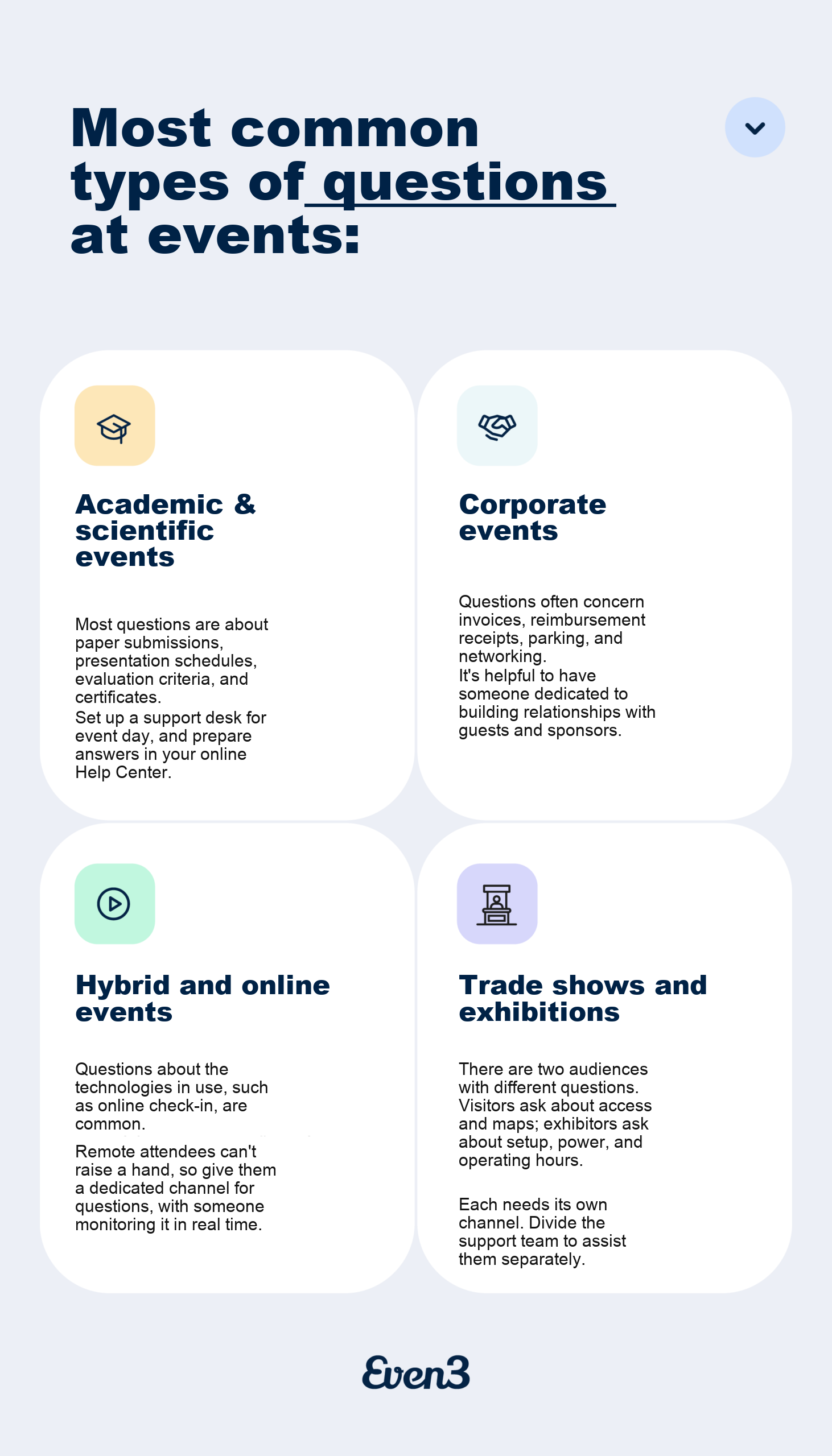
Most common types of questions at events
Tools for attendee support
While technology doesn’t replace the human contact that’s so important in event support, it handles repetitive work and can speed up problem resolution.
Currently, the market offers a few solutions, such as:
Chatbot for support
A chat robot instantly answers the most common questions, 24 hours a day, on the event website or on WhatsApp.
Tools like Zenvia, Take Blip, and Tawk.to serve events of different sizes.
Just set up the chatbot with your FAQ and it can provide initial support to attendees.
But always leave a visible way to reach a person. After all, a chatbot with no exit is irritating.
Help desk and ticketing system
Large or recurring events may need tools that build Help Center sites and organize support requests through tickets.
This organizes attendee requests and makes it easier to track service.
It’s a more advanced solution. Platforms like Zendesk, Freshdesk, Movidesk, and Octadesk queue requests, log history, and prevent a question from getting lost among emails.
Event app
An event app is an ideal option for centralizing attendees’ questions and making event day easier for everyone.
It works as a way to address attendees’ main pain points: schedule, event map, FAQ, sponsor or exhibitor contacts — everything is right there in the palm of your hand! This way, far fewer people need to visit the information desk.
Digital check-in
Check-in tends to be the biggest source of questions and lines at an event. That’s why choosing technology solutions creates a first impression that positively impacts attendees!
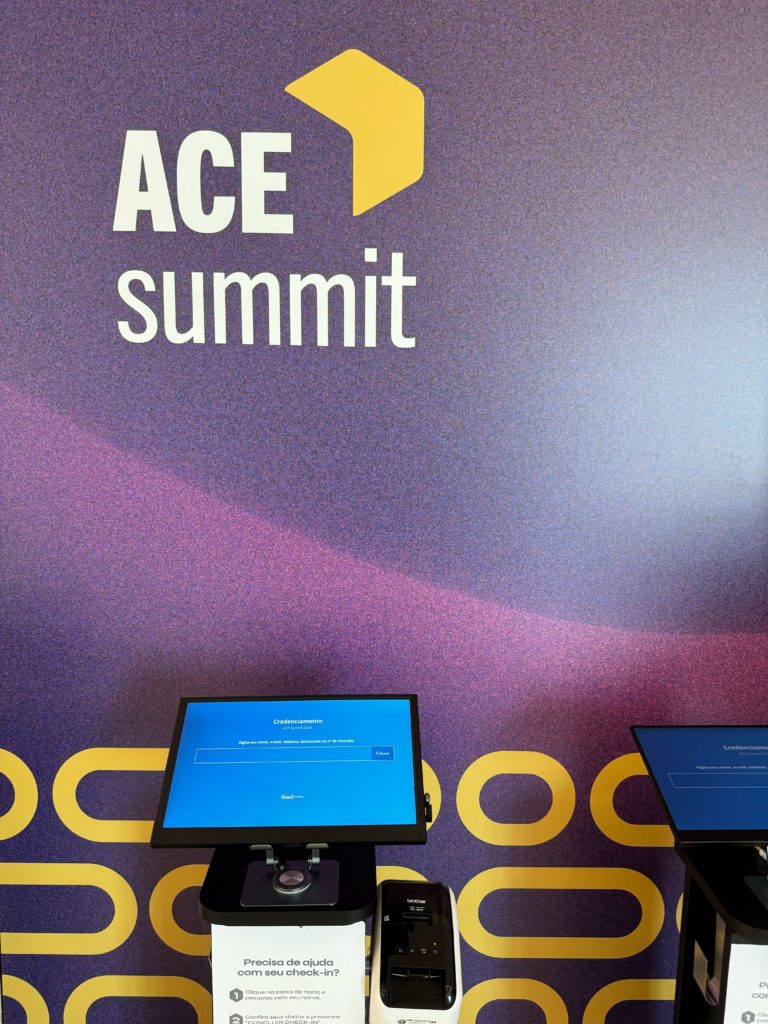
It’s common to see events using QR code check-in through an app or a self-check-in kiosk, like Even3’s:
Forms and surveys
To find out whether the event’s support was satisfactory, it’s common to create survey and feedback forms.
Commonly used tools for this include Google Forms, Typeform, and SurveyMonkey.
There’s also the option of using an events platform, like Even3, which sends the forms to attendees by email and centralizes the responses in the same place where you organize the whole event.
This makes it easier to track the results and share them with the organizing team.
Live interaction tools
Slido and Mentimeter collect questions from the audience during talks and take the pressure off the open mic.
But if you want to start with just a few tools, the best option is to look for an events platform.
For example, on Even3 you can send questions, create polls, and run giveaways at events. At an online or hybrid event, using these features during the broadcast increases audience engagement and makes interaction easier.
How to measure support: feedback and NPS
To know whether you’re providing good support to attendees, it’s essential to track indicators such as:
Collect feedback while it’s fresh
Send the satisfaction survey within 24 hours after closing, while the memory is still fresh.
Use a short form, up to five questions, and include an open field — that’s where the best suggestions show up.
Ask about specific points: check-in, clarity of the schedule, staff service, venue structure.
Track your event’s NPS
NPS stands for Net Promoter Score, an indicator that measures how likely someone is to recommend your experience.
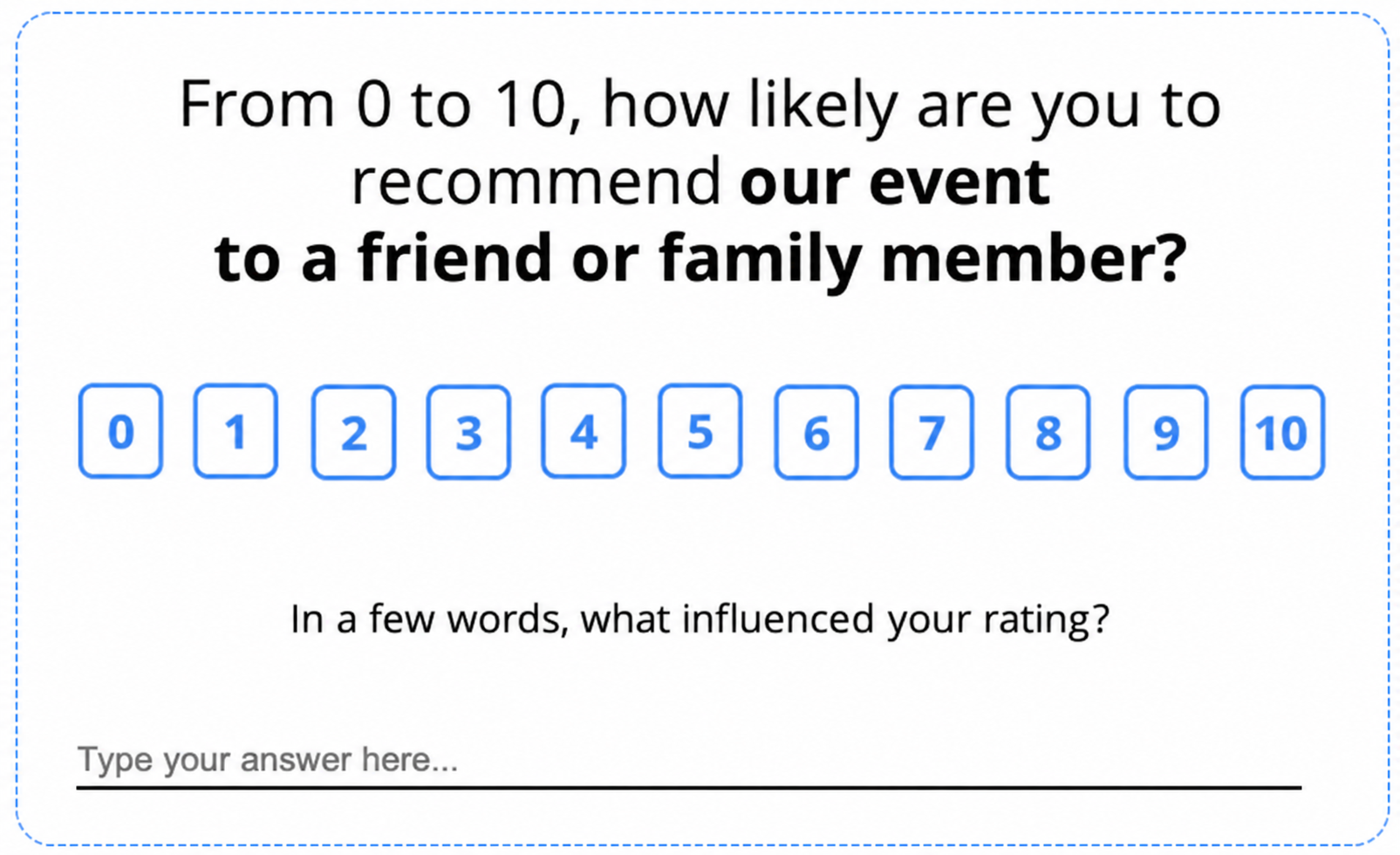
Here’s how it works:
- Ask a question: “On a scale of 0 to 10, how likely are you to recommend this event to a colleague?”
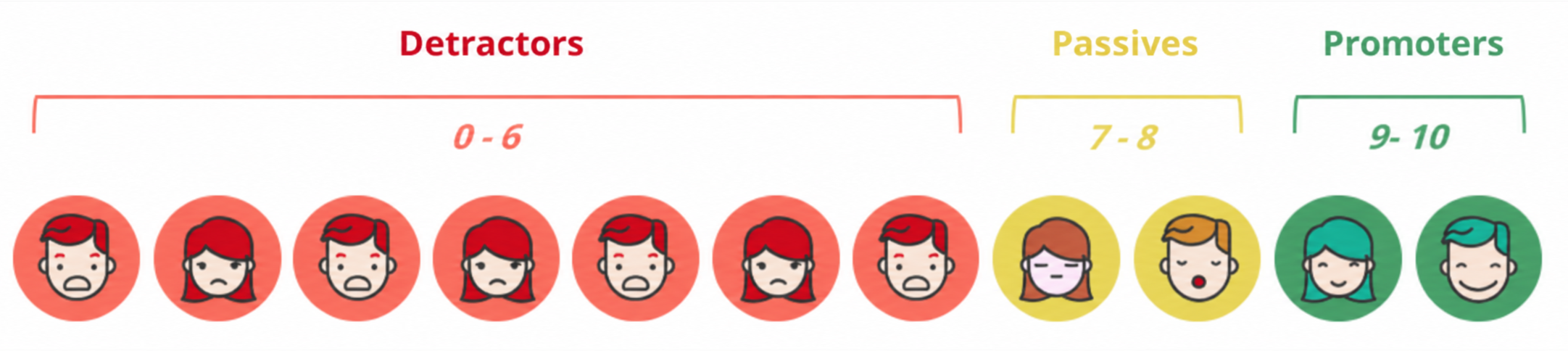
- Split the answers into three groups: promoters (9 and 10), passives (7 and 8), and detractors (0 to 6).
- Calculate: NPS = % of promoters − % of detractors.
The result ranges from −100 to 100. For example, out of one hundred responses, with 60 promoters, 25 passives, and 15 detractors, the NPS is 45.
While feedback collects more detailed information, NPS is the number that reinforces it.
That’s why the number should be tracked edition after edition. The trend says more than the isolated value.
Also, read detractors’ comments carefully: they point exactly to where support fell short.
How many people do I need on the support team?
Now that you know how to set up attendee support, many people still wonder how many people are needed for it.
The answer is broad: it depends! What determines the need for a support team is the flow of people at an event, not just the number of attendees.
That’s why it’s important to map the points with the most flow (check-in, presentations, post-talk Q&A, etc.) and identify whether they need human support.
When thinking about the number of helpers, it’s important to hire one extra person to handle the unexpected.
Also, the size of your team can shrink drastically if you choose to use an events platform.
That’s because the platform centralizes most of the support tools an event needs, in addition to simplifying their use.
This way, your team gains more agility and autonomy to solve problems.
For example, a platform like Even3 offers a website and an app for the event. Through them, you can add the FAQ, the support chatbot, send notifications, and more.
Depending on the size and format of the event, this may eliminate the need for an information desk on the day. Just ask attendees to check the app. Makes sense, right?
In short, offering support to your attendees can be quite simple. Just start with the basics!



