Today, events that decide in the dark get left behind!
The data proves it: according to Forrester, data-driven companies grow, on average, more than 30% a year compared to their peers.
After all, when data is collected and analyzed the right way, you can make predictions and act intelligently to reach your business goals.
This is no different for events! Data-driven events leave guesswork behind and use data to grow and generate real impact.
But I’m not just talking about collecting data through satisfaction surveys. Below, I’ll show you how to build a truly data-driven event:
- What is data-driven?
- Why does a data-driven culture matter?
- How to apply a data-driven culture at events?
- Data collection tools for events: where to start?
What is data-driven?
First, let’s clarify what being data-driven means.
Being data-driven means making decisions guided by concrete data, not just intuition, past experience, or isolated opinions.
In practice, a data-driven approach involves:
- Collecting relevant, secure data;
- Organizing and integrating that information;
- Analyzing the data with clear objectives;
- Using insights to guide strategic decisions.
When we talk about what data-driven means in the context of events, we’re talking about using information like registrations, audience profile, attendee behavior, activity engagement, check-in, feedback, and post-event results to continuously improve your strategy.
Why does a data-driven culture matter?
Obviously, when you create an event, you probably want to adopt the best technologies to make it better. But that alone isn’t enough!
The real differentiator lies in a data-driven culture.
That’s because a data-driven culture ensures that:
- You choose the technologies that actually deliver results for your event;
- Strategic decisions are safer and less risky;
- Results can be measured and presented clearly;
- The event evolves with each edition, based on real learnings;
- Sponsors and partners see concrete value in their investment;
- Teams work aligned around common metrics and goals.
At larger-scale events, data integrity can determine the success or failure of the whole operation.
After all, fragmented, inconsistent, or disconnected data makes analysis harder, delays decisions, and weakens the perceived value of the event.
So, beyond simply collecting information, it’s essential to trust your data. And that only happens with control, standardization, and integration.
How to apply a data-driven culture at events?
As I mentioned, you need to be careful with the data you collect.
Also, building a data-driven culture at events is an ongoing process. So this journey needs to be structured around the following steps:
1. Organize data collection before anything else
First, you need to decide what data you’ll collect and how you’ll do it.
In other words, before you even open registration, it’s essential to define:
- What data will be collected;
- Where that information will be stored;
- Which tools you’ll use and how they’ll integrate with each other.
At this stage, the goal isn’t to collect as much data as possible, but what actually makes sense for your event’s objective.
For example, if you want to use the event to attract leads, it’s important to track data related to that metric, like acquisition channels and number of leads collected.
It’s also important to integrate your event management platform with your CRM, marketing automation, and sales tools, ensuring data flows without interruption from the very first contact with an attendee.
Common challenges at this stage include:
- Data scattered across different tools;
- Lack of standardization in fields like job title, company, or industry;
- Difficulty cross-referencing marketing, sales, and operations data.
That’s why it’s important to assign someone responsible for collecting and analyzing data, create standardized forms, have well-structured data protection policies, and clearly define objectives from the start of the event.
2. Capture real-time data at registration and check-in
Next, you can start collecting valuable information!
Registration is the first active point of contact with the attendee, and one of the most critical steps for ensuring clean, reliable data.
Best practices include:
- Smart forms: collect only essential information at first, so the registration process doesn’t feel slow;
- Progressive profiling: enrich data throughout the attendee journey with audience survey forms;
- CRM integration: automatically sync registration data with your customer relationship tools;
- Real-time check-in: use QR codes or kiosks to track entries, reduce lines, and generate instant operational data.
This data helps both the attendee experience and decision-making during the event.
3. Track attendee behavior during the event
Once the event starts, data collection opportunities multiply.
You can track:
- Attendance at talks and sessions;
- Engagement with activities and content;
- Behavior within the event app;
- Browsing data, clicks, and interactions on the event website.
This information reveals what actually generates value for your audience.
This way, you can adjust strategies in real time — from schedule changes to more effective sponsor activations.
4. Automate reports and turn data into stories
Traditionally, many organizers only look at data after the event, and even then, only superficially.
To be truly data-driven, your event needs to go beyond basic metrics, like the event evaluation survey.
In practice, a data culture connects valuable information to real results, such as:
- Qualified lead generation;
- Number of closed sales;
- Number of returning attendees;
- Audience satisfaction and engagement.
Obviously, to reach these results, you need to know how to interpret and connect the data.
In this context, having tools that build automated reports really helps!
With them, the focus shifts from “crunching spreadsheets” to telling the story of the event’s impact, using data to show real results and support future decisions.
Data collection tools for events: where to start?
Now it’s time to put the tips above into practice. So, which tools should you use?
As I mentioned, you don’t need to collect every piece of data in the world! Above all, remember: your data needs to align with the event’s objectives.
With that in mind, it’s time to choose what to collect. These tools can help:
1. Analytics tools
These tools focus on tracking user behavior across digital environments, like websites and registration pages.
They show where visitors come from, which pages they visit, where they drop off, and which channels generate the most conversions.
How to use it: integrate Analytics with your event website and registration pages, or use an event platform with this feature built in, like Even3.

Example use: identifying that most registrations come from a LinkedIn post and doubling down on that channel for event promotion.
2. Online registration form
This is the main entry point for attendee data. Beyond collecting basic information, it can capture strategic data about your audience’s profile, interests, and goals.
How to use it: create clear, objective forms with fields relevant to your event type.
Example use: collecting field of work and experience level to segment communications and content during the event based on the audience.
3. CRM tools
A CRM is a relationship management tool, like RD Station. With it, you centralize contact data and can track relationships with attendees, leads, customers, and sponsors.
How to use it: integrate event registration data with your CRM to maintain a history of interactions.
Example use: identifying recurring attendees and creating exclusive offers for future editions.
4. Marketing automation
These tools, like Mailchimp, let you create automatic email flows and behavior-based communications.
How to use it: connect registration and engagement data to trigger personalized messages.
Example use: after the event, running campaigns to sell services, products, or promote your next edition.
5. Check-in app
Digital check-in solutions collect real-time data on attendance and attendee flow.
How to use it: use QR codes or check-in apps to log entries and exits.
Example use: tracking attendance at activities and analyzing which ones had the most participation.
6. Satisfaction surveys
Essential tools for collecting qualitative and quantitative feedback from your audience.
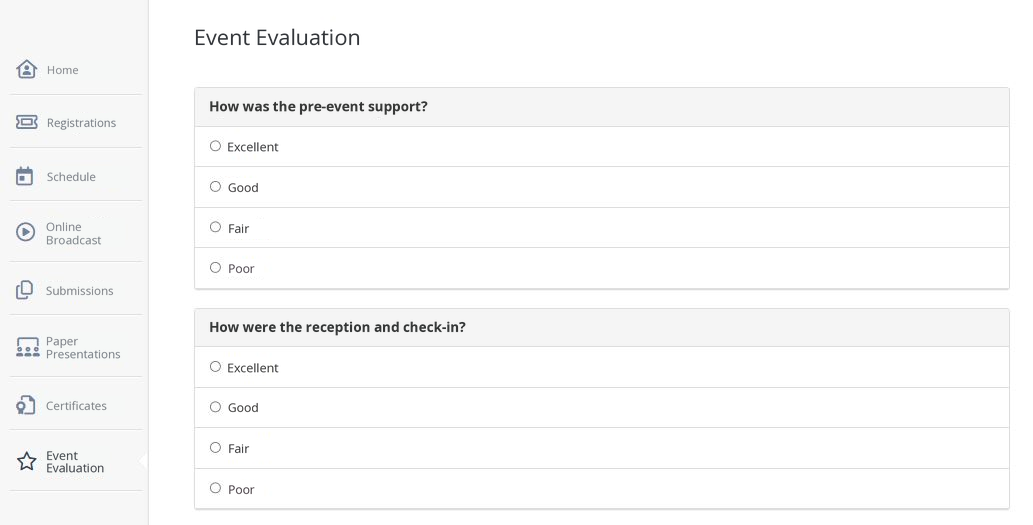
How to use it: run surveys after talks or at the end of the event.
Example use: measuring the event’s NPS and identifying which talks delivered the most value for attendees.
7. Custom forms
These can be used for various purposes beyond registration, like collecting feedback on specific activities and audience surveys.
How to use it: create forms using tools like Google Forms or within event platforms like Even3.
Example use: activating audience survey forms during the event to better understand your attendees and complement the information gathered at registration.
8. Event platforms
Finally, event platforms can be a great option because they bring all these tools together in one place.
This makes it easier to collect, integrate, and analyze data.
In other words, event platforms centralize registrations, payments, check-in, forms, reports, and performance metrics.
How to use it: choose a platform that offers data collection technologies, like online forms, automated reports, and integrations with other tools.
Example use: using the platform’s Analytics to build reports on the channels that generated the most traffic and the days with the highest number of purchases.
You can do all of this with Even3! It’s a complete platform for data-driven events.
That’s because it brings together online registration, smart forms, Analytics, QR code check-in, satisfaction surveys, and reports that help you turn data into strategic decisions, all in one place.
Want to see how it works in practice? Create your event for free right now.



