Do you remember when you had to go to a box office just to buy a ticket? How long did that take you? 30 minutes?
Today, it only takes 5 minutes to access a website on your phone, buy a ticket, and pay for it on Even3.
Convenience has made online ticket sales popular and widespread.
But with so many virtual options now available, do you know how to get the most out of your ticket sales platform?
In this article, we’ll teach you everything about it. Learn how ticket sales work on Even3 and more:
- What is Even3?
- How does ticket sales work on Even3?
- 8 tips for creating tickets
- How much should you charge per ticket?
- Transferring registration revenue to your bank account
What Is Even3?
Even3 is one of the largest event platforms in Brazil, because it centralizes the main event management solutions.
Ticket sales, for example, are one of the hardest steps in organizing an event, since they involve costs, sales tracking, registration forms, and more.
But not on Even3! With the platform, you get a website to sell your tickets, you can create as many ticket types as you want, and you can even track your sales numbers in real time.
On top of that, you also have access to other features in the same place, such as check-in, an online streaming area, automatic certificate delivery, and more.
This makes it easier to centralize the organization, share it with other organizers, and promote your event. Here are some tips to do it the best way!
How Does Ticket Sales Work on Even3?
Set Up Your Event Website
As soon as you create an event on Even3, you automatically get a website.
You won’t need to touch any code or hire a specific team for it, unless you want to.
You’ll be able to customize that page however you want, in a simple and intuitive way.
Start by adding the essential details of your event, such as name, date, location, cover image, and activities.
Then, set the ticket types that will be available for your event and their prices, such as VIP, half-price, and others.
Create Your Online Registration Form
Customize your registration form however you like on Even3! You can choose the questions and even add a field to attach supporting documents.
But remember to keep your forms short. If needed, collect other data after the registration is confirmed.
That’s because research shows that 60% of people don’t want to spend more than 10 minutes filling out a form.
So don’t let people give up halfway through! Ideally, your form should only require answers to the essential questions.
8 Tips for Creating Tickets
1. Create Specific Ticket Types
In the Registrations menu on Even3, create as many ticket types as you want and charge different prices for your event.
You can segment ticket sales on Even3 by different registration categories, such as:
- Type: free, paid, or donation-based entry;
- Format: whether the ticket is specific to in-person or online attendees (for hybrid events);
- Category: the ticket name, specifying the registration category (e.g., Students, Professional, Full Price, etc.);
- Quantity: the number of spots available for the category you’re creating;
- Price: the ticket price in the event’s receiving currency;
- Validity: the period during which the registration category will be available to the public.
2. Send Marketing Emails to “Not Registered” Users
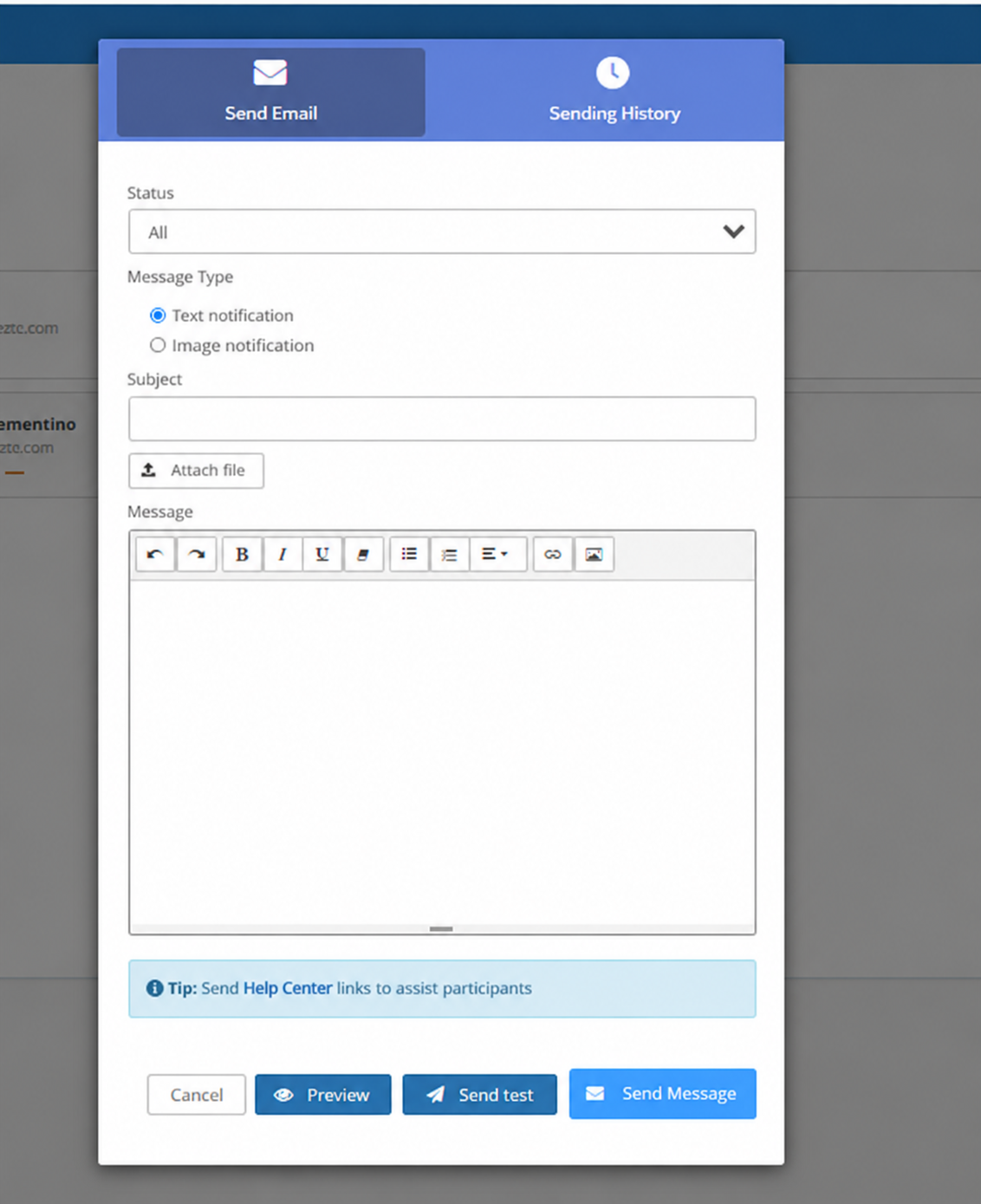
After creating your tickets and enabling your registration form, you can use the “Notify People” feature.
It’s very important for reaching people who gave up partway through registration.
So, when selecting “Notify People,” set the “Status” to “Not Registered” and create email marketing campaigns to win them back.
You can send content such as:
- Friendly reminder: “You started your registration but haven’t finished it yet! Secure your spot at [event name] before tickets run out.”
- Exclusive benefit: “Finish your registration in the next 24 hours and get an exclusive discount coupon.”
- Social proof: “See who has already confirmed their attendance at [event name] and don’t miss out!”
- Urgency: “Last tickets available! Finish your registration now.”
- News: “We just confirmed a new speaker! Don’t miss this unique opportunity.”
3. Enable Group Registration
Encourage greater participation in your event with special group pricing!
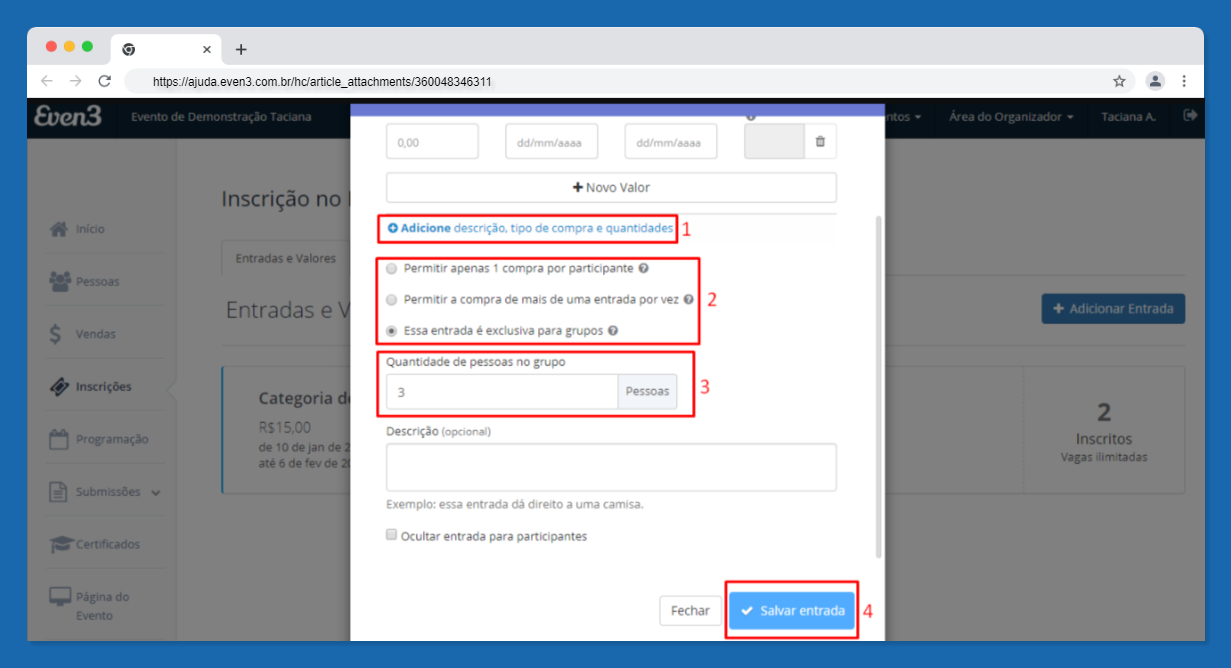
In the Registrations menu, enable group-exclusive purchasing and set the ticket price.
This gives your attendees another purchase option and increases variety for your event. It’s a great strategy to boost sales.
4. Create Discount Coupons
In the Registrations menu, create discount coupons specifically for your attendees.
You can set special codes, such as the names of commemorative dates, influencers, or sponsors.
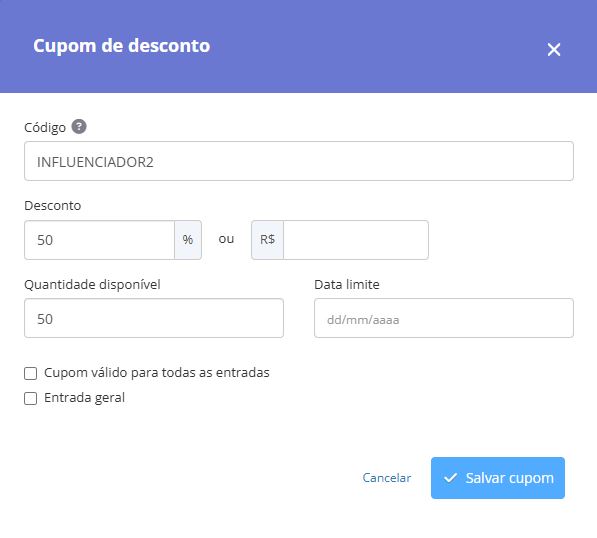
You can also choose the period during which coupons will work and how many are available.
This lets you create marketing campaigns built around urgency and scarcity.
5. Enable Affiliate Links
Still in the coupons area on Even3, you can create exclusive coupons for people affiliated with your event, such as influencers or sponsors.
In addition to getting a unique discount code, you can generate a unique registration link for each affiliate.
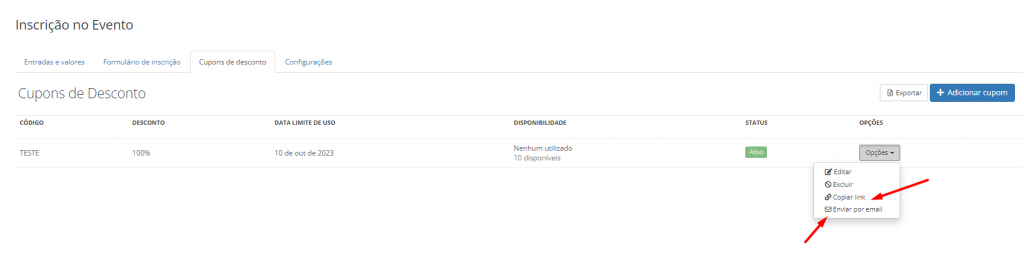
This way, you’ll be able to track how many registrations were generated by each link and have concrete data to analyze the results of your partnerships.
6. Set Up Batch Price Changes
As mentioned, you can determine the time period during which each ticket type will be available for purchase.
This feature is ideal for creating the well-known “batch price changes.”
These are very important strategies for increasing ticket sales, since they encourage purchases and secure cash flow early in the event.
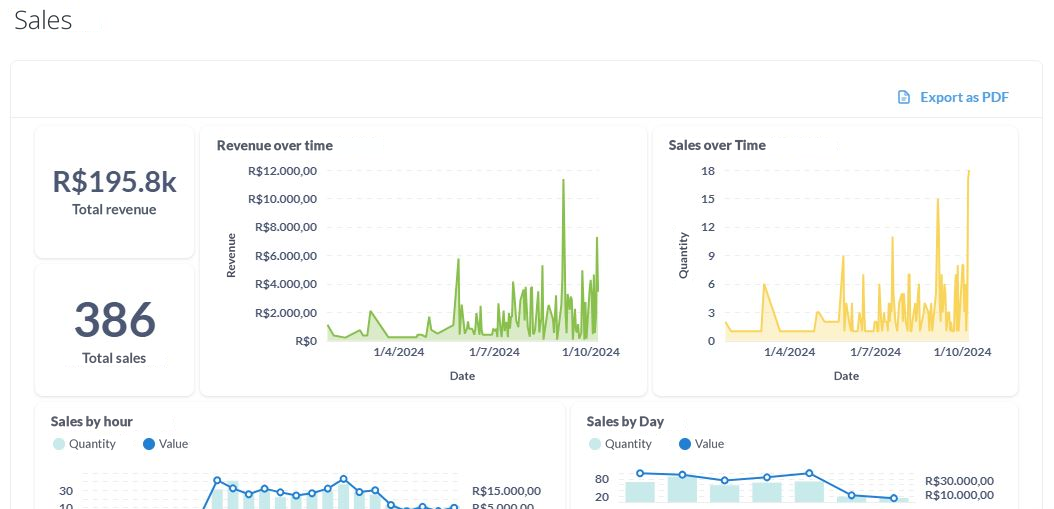
In fact, events like CBIS’24 proved this theory on Even3, registering their biggest sales spikes on batch change days:
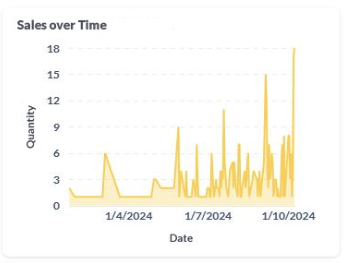
And you can do the same for your event!
To do so, just set different ticket types to start and end on alternating days. Then, track the data in Even3 Analytics.
7. Understand the Refund Guarantee
You’ve probably already realized that offering more security to your attendees will boost your sales, right?
On top of that, more flexibility and payment options make it easier for people to complete their purchase.
So, you can offer guarantees such as:
- Multiple payment methods, such as instant payment and credit card installments;
- Secure purchase area with data encryption;
- Refund guarantee in case the attendee has an unexpected issue on the day of the event.
This is an optional service, paid separately by the attendee who wants it. So, the organizer never loses anything, and the feature can be disabled in the Registrations menu.
8. Sell Tickets on Even3 to Other Countries
Another convenience Even3 offers is selling tickets to people from other countries.
First, currency conversion is handled right on the platform.
This lets attendees pay using local payment methods, reducing extra fees on the purchase.
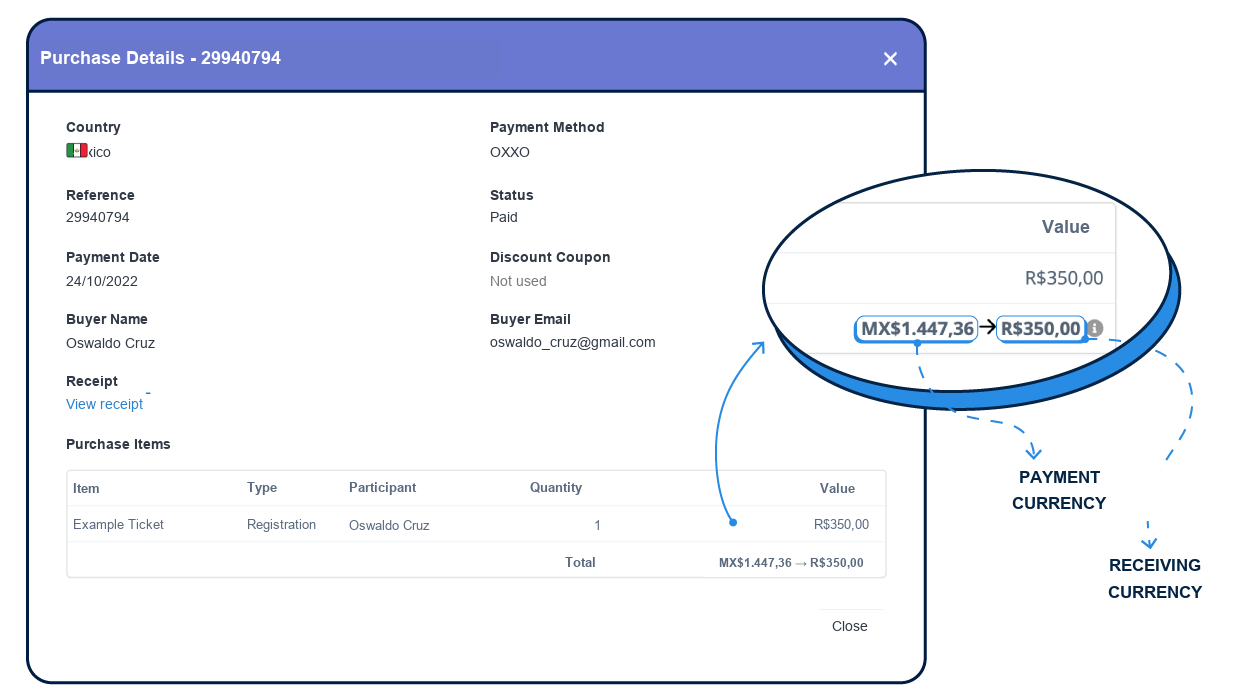
Even3 is also the only event platform in Brazil with Purchasing Power Parity.
That means it automatically adjusts the ticket price to an affordable amount based on the attendee’s country exchange rate.
For example, say you want to buy a ticket for an event in the United States, priced in dollars.
After conversion, the ticket price might end up much higher than its real value, since the dollar is a stronger currency.
But Even3 organizers can set discount coupons for groups of countries.
This way, it’s possible to offset exchange rate differences with an innovative and secure solution.
It also encourages international participation and increases diversity at your event.
Finally, you’ll receive the full value of your international ticket sales in your local bank account.
How Much Should You Charge for a Ticket?
There is no pre-determined ideal price for events!
To decide how much to charge for your ticket, you should map out some important information, such as:
- Target audience: set a price that fits your audience’s financial conditions and expectations;
- Total event cost: calculate your expenses with venue, speakers, etc;
- Event format: remember to weigh the costs associated with best practices for in-person, online, and hybrid events;
- Competition: check the average prices charged by your competitors;
- Perceived value: want to profit from your event? Charge above the total event cost based on the benefits it delivers and the value your audience perceives in it.
Transfer Registration Revenue to Your Bank Account
Finally, it’s time to collect the funds raised from ticket sales and send them to your bank account.
On Even3, you can do this at any time, as many times as you want, as long as you have an available balance in the Sales menu.
Just keep in mind that, despite having the lowest fee on the market, this transaction includes a bank transfer fee of a small amount charged per transfer.
So use it wisely! And remember that all bank transactions take time.
This also happens to protect you, since anti-fraud checks and actions are carried out during that period.
So plan the withdrawal of your ticket sales in advance.



