Thinking about interactivity solutions for your event? Then let us teach you how to engage attendees through notifications, whether through an event app or the People menu on Even3.
In 2021, a Forrester survey found that 61% of online event organizers said keeping their audience engaged was their biggest challenge.
With that in mind, notifications can be your allies for improving the attendee experience, both by encouraging engagement and by communicating important, urgent information at your event.
Find out more:
- Why engage attendees?
- How to engage attendees through notifications;
- Notification examples for events;
- Apps for sending notifications.
Why engage attendees?
A common concern for online events, engagement has been top of mind for many organizers.
After all, is it worth worrying about? The answer is: YES! But finding solutions to engage attendees can be much easier than you think.
First, according to a 2021 Bizzabo survey, only 18% of online event attendees said they didn’t want to socialize.
So we can see that socializing and networking are core expectations of events, even ones where you can’t shake hands or hug people you just met.
So it’s very important to reinforce these points, since it’s something your attendees expect and will certainly help you build loyalty for future editions.
Also, what sets events apart is the sharing of information between people. That exchange is what differentiates a great event from simply reading a book on the same topic, for example.
In other words, the more moments of engagement and learning your event creates, the more successful it will be! So how do you do that?
How to engage attendees through notifications
There are many ways to engage attendees, but today we’ll focus on notifications.
These are small, direct, objective messages sent for a few purposes, such as:
- Encouraging action;
- Informing about urgent changes;
- Reminding attendees of activities or deadlines;
- Sharing news;
- Encouraging communication between organizers and attendees.
Notifications are usually sent by email or to phones through event apps, for example.
Among the main benefits are:
- Increasing traffic to the event website;
- Speeding up the delivery of information;
- Increasing the read rate of messages sent to attendees;
- Boosting registrations and engagement at the event.
But don’t just send them however you like! To improve your notifications’ performance, you can follow a few best practices, such as:
Write objective, short, and to-the-point messages
Notifications should be texts that can be read and understood quickly. Go for scannable copy — text that can be minimally understood just by skimming it.
Grab attention
Notifications need to stand out among so much online information, so use images, emojis, or attention-grabbing calls to action.
Don’t overdo the number of notifications
Notifying is important, but don’t overwhelm attendees with information — that can lead them to turn off all communication with you.
Test
Make small changes to your notifications. For example, you can send notifications with different titles and see which one has the highest open rate.
Track your data and adjust your strategy
Watch your open rate or click numbers to see whether your notifications are working and reaching their goals. If they aren’t, try changing your strategy or running more tests.
Notification examples for events
Calendar
Grab your attendees’ attention with urgent language and share important dates from your event’s calendar:
🚨 LAST HOURS to submit your paper! Don’t miss the submission deadline. Click here to submit your paper now.
Reminders
Use notifications to remind specific groups, like people who haven’t registered yet, of important information.
🔔 ATTENTION, [ATTENDEE NAME]! You’re not registered for “EVENT NAME” yet. Click here to complete your registration and not miss out.
Discounts or promotions
Is there anything more eye-catching than a discount? When it comes to selling more tickets, we don’t think so!
Here you can get creative and offer exclusive discounts and coupons for your attendees, almost like the notifications you get from a food delivery app.
🎁 DISCOUNT COUPONS FOR YOU! Enjoy our gift, today only, and shop items from our store with X% off.
Traffic
Want to drive your registrants somewhere else, like your event’s website, or get them to download something? Use notifications!
This can even be a great communication strategy for your event’s marketing.
Hey [Attendee Name], I have a gift for you! 🎁 Click here and download the e-book “How to Network at Events” for FREE.
Apps for sending notifications
Now that you know how to write your notification content, let’s look at how and where to send it. Here are your options:
Event app
Some event management platforms offer the option to create a dedicated app for your event.
This way, attendees can find everything they need in one place, such as schedules, activity registration, sponsor booths, and more.
Among the many features an app offers is quick communication with attendees through notifications, plus space for content within the app itself.
With in-app notifications, you can remind attendees of activities, encourage them to take some action within the app, promote flash deals in the event store, and much more!
OneSignal
Another option for sending notifications is using push notification apps, like the ones featured on our blog.
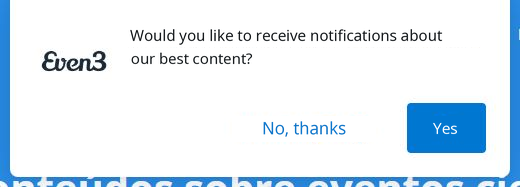
These are small “pop-ups” that can be sent to a contact base.
Among the best-known apps for this is OneSignal, an app that lets you send notifications for free to up to 30,000 people.
With it, you can send notifications with text, photo, and a link to an email list or other more detailed segments.
Notify People on Even3
On the other hand, learning and keeping up with yet another app can be a bit more work.
With that in mind, Even3 decided to bring everything essential for your event together in one place.
So there are two ways to send notifications through the platform: Notify People and Alert on the event website.
Notify People
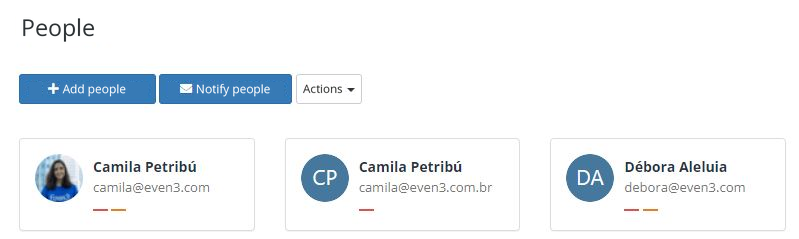
With Even3’s “Notify People,” you can split your event’s audience and send specific emails to each group, plus personalize fields with the registrant’s name, for example.
This way, your email will feel even more personal and can build closeness and communication.
Alert on the event website
In the “Event Page” menu, set up an alert to display a kind of pop-up on your event’s website.
But remember: use it wisely. An unnecessary alert can hurt the attendee experience on your site and overwhelm them.
So avoid heavy images and long text, and write in a way that’s easy to scan.
A great use for the alert is highlighting flash sales, discount coupons, or the last days to buy a batch of tickets.
How about giving it a try? Create your event for free on Even3.



